August 14, 2026
Problem:
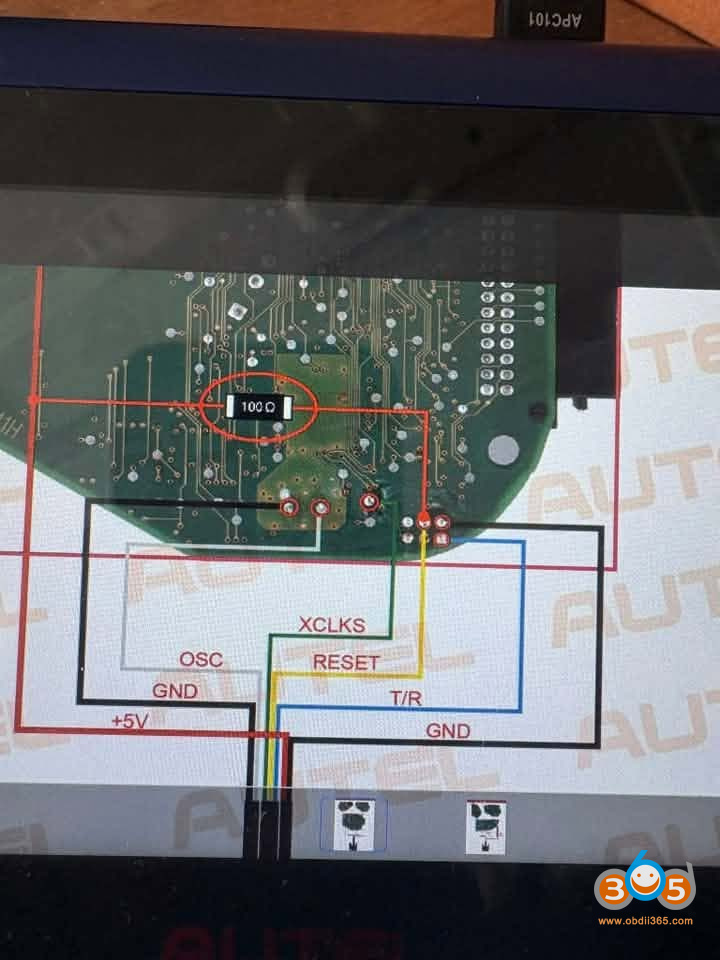
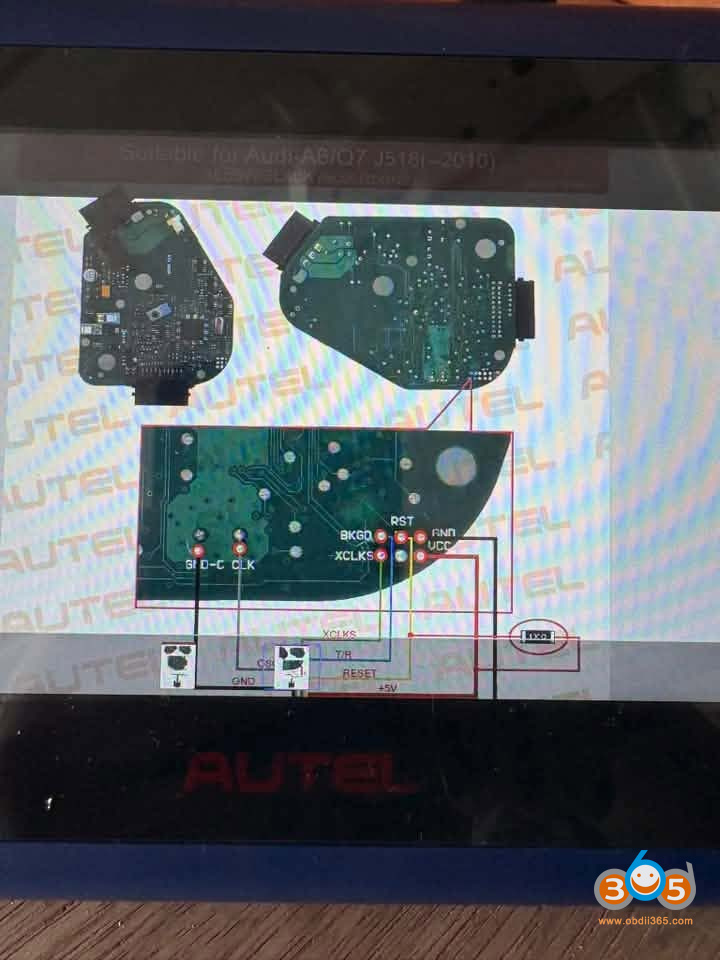
I am attempting to bench read this J518 ELV module off a 2006 Audi A6 with anAutel IM508 xp400pro. I have tried connecting to both modules I have and neither will connect/read. Am I missing something here, or does the xp400pro need a 12vdc supply for bench work?

Solution:
Need to be hooked up to a 12 V supply.
Autel device has all the diagrams. There are two types of wiring diagrams.


Autel shows a resistor is needed as well.

Posted by: jean at
08:59 AM
| No Comments
| Add Comment
Post contains 89 words, total size 4 kb.
August 13, 2026
The MotoPro (from MTPRO) is positioned as a direct competitor to the TMPro2 in the motorcycle key programming space, offering innovative procedures at a fraction of the cost—roughly one-quarter of the TMPro2’s price.
Where the TMPro2 requires users to purchase licenses separately, the Moto-Pro comes out of the box with 17 licenses already activated—a value exceeding $5,000 if purchased through the competition. Furthermore, any additional software activations for the Moto-Pro cost less than 30% of what TMPro2 charges for comparable upgrades.

Here comes the software function and license comparison between MOTOPro and TMPro2.
Free Functions:
| Bike brand | Function description | TMPro2 Module Name | TMPRO2 Price | MOTOPRO Price |
|---|---|---|---|---|
| BMW Motorrad | BMW 4D MTA Dashboard 95c160 / Husqvarna | SW 186 – BMW C600 C650,Husqvarna Nuda dashboard | € 1200 | FREE |
| Ducati | Ducati Dashboard Marelli | SW 58 – Ducati bikes dashboard Marelli | € 200 | FREE |
| Ducati Dashboard Digitek | SW 101 – Ducati bikes dashboard Digitek | € 150 | FREE | |
| Honda | Honda 93c46 / 93c56 / 93c66 / 93c86 / MPCXXX | SW 96 – Honda bikes ECU Keihin,OKI | € 250 | FREE |
| Suzuki | 93c66 / 93c86 / 24c02 / 24c16 / 24c64 | SW 67 – Suzuki bikes engine ECU Denso | € 250 | FREE |
| 24c02 / 93c66 | SW 97 – Suzuki scooter ECU Keihin | € 100 | FREE | |
| Yamaha | Seiko S29190 | SW 66 – Yamaha bikes immobox Moric | € 250 | FREE |
| 24c04 | SW 90 – Yamaha scooter ECU Mitsuba | € 100 | FREE | |
| 93c56 | SW230 Yamaha Majesty 125 engine ECU | € 100 | FREE | |
| Kawasaki | GTR 1400 | SW 196 – Kawasaki GTR1400 switch Asahi-Denso | € 500 | FREE |
| JetSki Ultra motorboat | SW 162 – Kawasaki JetSki Ultra engine ECU ID4D | € 250 | FREE | |
| All Kawasaki Mechanical keys (93c66 / 86 / 24c02 24c04 24C08 / 24c64 95640) | SW 68 – Kawasaki bikes engine ECU Denso | € 250 | FREE | |
| Kove Haojue | KOVE 500X: PCF7938X | – | – | FREE |
| Moto Guzzi | GUZZI MGX-21 Audace EEPROM 24c32 Dash | SW 208 – Moto Guzzi dashboard type 1 | € 200 | FREE |
| Aprilia Piaggio Vespa | Aprilia Moto Guzz | SW 98 – Aprilia scooter dashboard Digitek | € 100 | FREE |
| MC68HC05E6 SO28 | SW 25 – Seat, Peugeot, Piaggio bikes immobox Marelli | € 100 | FREE | |
| Peugeot ECU Marelli | SW 25 – Seat, Peugeot, Piaggio bikes immobox Marelli | € 100 | FREE | |
| EFI-ECU | SW 128 – Gilera, Piaggio bikes engine ECU EFI | € 200 | FREE | |
| Piaggio Vespa Apulia throttle valve Anti-theft | SW 131 – Gilera, Piaggio bikes engine ECU Marelli | € 200 | FREE | |
| OTHER | FREE Pincode from Yamaha smart-key | – | – | FREE |
| Hands-Free Yamaha SCU 24c02/04 93C56 Calc PIN | – | – | FREE | |
| Hands-Free Suzuki SCU 24c02/04 FOB Calc PIN | – | – | FREE |
Paid License
| Motorbike | MOTOPRO Module Name | TMPro2 Module Name | TMPRO2 Price | MOTOPROPrice |
|---|---|---|---|---|
| BMW Motorrad | Module 21 – BMW Hands-Free 8A – AKL/Add | SW 198 – BMW bikes handsfree unit HUF | € 800 | € 610 |
| Module 30 – BMW ECU bikes PCF7936 | SW 109 – BMW bikes engine ECU Bosch | € 100 | € 87 | |
| Module 31 – BMW Bikes 2012 immobox EWS | SW 191 – BMW bike 2012 immobox EWS | € 1200 | € 442 | |
| Module 32 – BMW ZADI Bikes BMW GS1300 | SW 232 – BMW bike handsfree key unit ZADI | € 400 | € 260 | |
| Ducati | Module 9 – Ducati 2013 Hypermotard dashboard MAE eeprom 24c02 | SW 189 – Ducati Hypermotard 2013 dashboard MAE | € 100 | € 87 |
| Module 5 – Ducati Monster dashboard MTA Memory EEPROM 24C16 | SW 192 – Ducati 821 dashboard MTA | € 100 | € 87 | |
| Module 3 – Ducati Monster dashboard COBO | SW 193 – Ducati 1200 dashboard COBO | € 100 | € 87 | |
| Module 8 – Ducati Scrambler | SW 197 – Ducati Scrambler dashboard | € 100 | € 87 | |
| Module 7 – Ducati Multistrada dashboard MAE | SW 205 – Ducati Multistrada dashboard MAE | € 100 | € 87 | |
| Module 6 – Ducati Panigale V4 dashboard MAE | SW 209 – Ducati Panigale V4 dashboard COBO | € 100 | € 87 | |
| Module 10 -Ducati bikes handsfree ZADI | SW 178 – Ducati bikes handsfree ZADI | € 100 | € 87 | |
| Module 4 – Ducati immobox ZADI-V1 | SW 182 – Ducati Panigale immobox ZADI | € 100 | € 87 | |
| Module 20 – Ducati Scrambler 95C512 | SW 210 – Ducati Scrambler 1100 dashboard | € 100 | € 87 | |
| Module 26 – Texas Crypto AES 128-bit 8A hands free key | – | – | € 651 | |
| Module 22 – Ducati KTM Texas Crypto 4D Copy | SW 65 – Key copier for 4D Texas crypto keys | € 150 | € 74 | |
| Module 33 – Ducati Scrambler 800 2024 | SW 233 – Ducati Scrambler 800 dashboard | € 100 | € 87 | |
| KTM | Module 13 – KTM Bikes immobox ZADI | SW 129 – KTM bikes immobox ZADI | € 100 | € 87 |
| Module 14 – KTM- immobox ZADI-V2 | SW 183 – KTM bikes immobox ZADI type 2 | € 100 | € 87 | |
| Module 15 KTM Bikes immobox SPARK | SW 226 – KTM bikes immobox SPARK | € 100 | € 87 | |
| Module 16 – KTM-ZADI – 9S12GA240 | SW 204 – KTM bikes handsfree ZADI | € 100 | € 87 | |
| Module 27 – KTM Hands-Free Key-8A | – | – | € 618 | |
| YAMAHA | Module 2 – YAMAHA MORIC MCU | SW 108 – Yamaha bikes immobox Moric type 2 | € 500 | € 228 |
| Moto Guzzi | Module 11 – Moto Guzzi dashboard 2 – 24C512 Aprilia Piaggio | SW 207 – Aprilia dashboard COBO | € 100 | € 87 |
| Module 12 – MV Agusta bikes dashboard | SW 171 – MV Agusta bikes dashboard | € 250 | € 74 | |
| Bombardier | Module 18 – ECUIMMO-PCF7936 | – | – | € 110 |
| Module 1 – IMMO-BOX-MCHC908-12 | – | – | € 242 | |
| Honda | Module 17 – Honda bikes ECU Keihin type 2 | SW 223 – Honda bikes ECU Keihin type 2 | € 250 | € 130 |
| Module 23 – Honda FOB | – | – | € 167 | |
| Module 24 – Honda Gold Wing Pin | – | – | € 465 | |
| Module 35 – Honda ECMID Reset w/o ECU Open via K-Line | – | – | € 68 | |
| Module 37 – Honda ECU Read eeprom K-Line | – | – | € 87 | |
| Piaggio / Aprilia / Vespa | Module 19 – Piaggio SCU PCF7939M | SW 227 – Piaggio bikes handsfree SPARK | € 100 | € 87 |
| Module 36 – Piaggio Aprilia Bench make key | – | – | € 170 | |
| Triumph | Module 25 – Triumph immobox PCF7936 | – | – | € 465 |
| Module 28 – Triumph Hands-free key Texas Crypto 4D | – | – | € 619 | |
| Module 29 – Triumph Hands-free key 4D Type 2 | – | – | € 619 |
Posted by: jean at
07:08 AM
| No Comments
| Add Comment
Post contains 1052 words, total size 12 kb.
August 12, 2026
CG FC200 programmer released new software version V1.4.0.0 on August 12th, 2026.
CG FC200 V1.4.0.0
1 Added Diesel ECU Read/Write Systems
| Denso: | Guofang: | Xinfeng: |
|---|---|---|
| - D34 | - MDD02 | - ECU13 |
| - D33 | - MDD06 | - ECU15 |
| - 5-Connector | - MDD07 | |
| - 2-Connector | Nanyue: | Weichai: |
| - Isuzu | - ECU022 | - 12B |
| ECTEK: | - ECU435 | - 15 |
| - F05 | - ECU437 | - 15C |
| - F06 | - ECU4PH | |
| - F17 | - R01 | Wittur: |
| - R02 | - ECU30 |
2 Added Gasoline ECU Read/Write Models
- BAIC / Zotye / Hanteng: 11GC
- Jiangling: DCM71AP
- Changan: EDC17CB1
- Ford: FORD ESU-415 7G91-12A650-ML
3 Added – DTC OFF Types
- Chevrolet: PE01
- Nissan Hitachi: S7253131N
- S75D5319N: S7553219N
- S75D5520N: S7555200N
- S75D5828N: S7555280N
- S75D5927N: S7555927N
4 Added – VIN Function
- Chinese Domestic ECUs: MED17.8.21
- MED17 (TC1782)
5 Added MED9.1 IMMO OFF Function
6 FC200 System Update
To improve the user experience, the FC200 system has been upgraded. The old DB15 cable is no longer compatible with the following systems. New DB15 cable for easier operation.
Honda / Acura:
- KEIHIN 37820-R48-H73 SH7058
- KEIHIN 37820-R48-H71 SH7058
- KEIHIN 37820-R62-H65 SH7058
- KEIHIN 37820-R62-H64 SH7058
- KEIHIN 37820-R63-H53 SH7058
- KEIHIN 37820-R72-TH64 SH7058
- KEIHIN 37820-R72-SF53 SH7058
- KEIHIN 37820-R72-TH64 SH7058
- KEIHIN 37820-Rxx-xxx SH7058
Users can switch back to the previous system if the new system has issues.
Optimized the IMMO OFF function to PCR2.1
Restored access to the "Three unready items" and "Replace CALID" function.

Posted by: jean at
07:42 AM
| No Comments
| Add Comment
Post contains 231 words, total size 4 kb.
August 11, 2026
Problem:
AnOBDSTAR DC706user was trying to clone a DME for a 2022 BMW X3. It’s an MG1CS201 locked ECU. He was able to unlock ECU withC4-06 adapterin boot mode, then read EEPROM, Flash data and ISN. He was able to write the EEPROM file to the donor unit. The problem is when he tried to write the Flash, it fails to erase sector 4 then quits. Is it possible to clone this module?


Here is the clue.
Not possible to clone/cannot directly clone.
There is OTP sector that you cannot write to.
This is the kind of job you reprogram ECU to car, not clone.
Only sync new DME.
The ISN needs to be transferred by obd2 (need both eeproms from original and donor). Then program afterwards with Esys. Need Windows laptop andEnet cable.Then adapt sync new DME via OBD2.
Posted by: jean at
07:17 AM
| No Comments
| Add Comment
Post contains 149 words, total size 5 kb.
August 10, 2026
OBDSTAR X300 Classic G3successfully added a spare 8A proximity smart key to a 2024 Toyota Tacoma.
Connect a30-pin Toyota cableto bypass the gateway.
Read immo data. This function requires a network connection.
Then add key.
Eoneboss TLK-1collects the data after it is programmed to the car, then transfers the data it collected and write it the unlock smart.
After program key, program ID box with steering lock.
Select immo data backed up, hold a programmed smart key agaigneset the start button to sync ID.
Images attached:


Posted by: jean at
07:20 AM
| No Comments
| Add Comment
Post contains 95 words, total size 12 kb.
August 07, 2026
CG100 Prog IIIreset Toyota 89170-42280 airbag crash successfully.
Part number: 89170-42280
Processor: R5F61725
Read and erase crash on bench mode.


Posted by: jean at
07:14 AM
| No Comments
| Add Comment
Post contains 28 words, total size 6 kb.
August 06, 2026
In this article, we'll cover the most frequently asked questions about this powerful ecu programming tool-OBDSTAR ECU Master.
The tool is divided into four packages: A, B, C, and D. These cover passenger vehicles, motorcycles, heavy-duty systems, and airbag systems respectively. Users can purchase the hardware with full package activation or choose individual package unlocks based on their specific needs.
Supported Vehicle Models
The ECU Master supports a broad range of manufacturers and modules. In the software, users can view a comprehensive list of compatible vehicles and systems. One notable feature is the color coding:
Red text indicates modules that are in beta version or have been recently added in the latest update.

Heavy-Duty Vehicle Support
A major differentiator for the ECU Master is its heavy-duty line support – a feature not available in other OBDSTAR tools like the DC706. The tool supports:
BCM, ECM, and TCM systems for trucks
Power/torque modification options
Solenoid writing
Actuator hours modification
Engine number changes
Power Supply Requirements
For heavy-duty vehicle programming, the tool requires an external power supply capable of delivering:
21–24V
At least 5A
This is critical to maintain stable voltage during programming – especially for truck modules.
Advanced Functions
While the ECU Master currently does not have a dedicated "Advanced Functions" menu like the G3, many advanced operations are already available within the specific module menus.
Common Questions and Answers
1. Will the DC706 Stop Working After the ECU Master Release?
No. The DC706 will continue to function normally. The ECU Master is a new tool with added capabilities (especially heavy-duty support), but it does not replace or disable existing tools. In fact, many of the functions available on the ECU Master are the same as those on the DC706.
2. Are MP001, P003, or P004 Adapters Needed?
No. Because the ECU Master is a new release, these adapters have already been integrated into the hardware. Users do not need to purchase separate adapters – all necessary connections are built in.
3. What About Fiat Systems?
Fiat has many systems currently under development. While some functions may not work 100% yet, the engineering team is actively working on implementation. Users may notice that some Fiat modules do not show a dedicated "Erase Crash" option. However, in many cases, performing a DTC erase will also clear crash data – especially on newer Fiat modules.
4. Why Do Some Modules Show Different Colored Connectors?
This is not unique to OBDSTAR tools – it's an industry-wide reality. The same module can come in multiple versions with different connector colors (e.g., white, gray, green, pink, yellow). If the tool doesn't show your specific connector version, you have two options:
Search for the pinout online using the module number
Contact OBDSTAR support for assistance
5. What If the Tool Won't Communicate with a Module?
If communication fails even after following the correct connection procedure:
Collect the log data from the tool
Send the logs along with the tool's serial number to the support team
Ensure your tool is within the update period so that test or repair files can be downloaded
The factory will analyze the logs and may send a test file. Turnaround time can vary (24–48 hours) depending on time zones and the complexity of the issue.
6. What Are Beta Versions?
Beta versions are test modules that are still under development. If a module is marked as beta and you encounter issues, simply send the log data to support. The engineering team will gradually improve and add functionality over time.
Bench vs. Boot Connections Explained
One common source of confusion is the difference betweenbench (BENCH)andboot (BOOT)connections:
| Connection Type | Description |
|---|---|
| Bench (BENCH) | Uses a dedicated connector or pinout. No soldering required. The tool provides step-by-step pinout diagrams. |
| Boot (BOOT) | Requires soldering to specific points on the PCB to unlock communication. The tool provides detailed diagrams showing which pins or capacitors need to be bridged or removed. |

Log Collection and Factory Support
When encountering issues, users are encouraged to:
-
Perform the connection as per the tool's instructions
-
If communication fails,collect log datafrom the tool
-
Send logs + serial number toOBDSTAR support
-
The factory will analyze and potentially send a test file
-
Wait for feedback (typically 24–48 hours)
This feedback loop iscritical for the tool's ongoing development, especially for beta modules.
Posted by: jean at
07:40 AM
| No Comments
| Add Comment
Post contains 719 words, total size 8 kb.
August 05, 2026
What is the difference between Thinkcar Thinkscar 689BT Pro, 689BT and Mucar 892BT lifetime-free-update diagnostic scanners?
Check the table comparison below:
| Feature | Thinkcar 689BT Pro | Mucar 892BT | Thinkcar 689BT |
|---|---|---|---|
| Screen Size | 8 inch | 8 inch | 8 inch |
| Memory | 4+64GB | 4+64GB | 4+64GB |
| Battery Capacity | 4150mAh | 4150mAh | 4150mAh |
| Protocols | ISO14230-4 (KWP2000) ISO15765-4 (CAN) ISO19141-2 (iso) ISO14229 (uds) SAEJ1850 (VPW & PWM) CAN-FD: DOIP J2534 |
ISO14230-4 (KWP2000) ISO15765-4 (CAN) ISO19141-2 (iso) ISO14229 (uds) SAEJ1850 (VPW & PWM) CAN-FD: DOIP |
ISO14230-4 (KWP2000) ISO15765-4 (CAN) ISO19141-2 (iso) ISO14229 (uds) SAEJ1850 (VPW & PWM) CAN-FD: DOIP |
| AI Assistance | x | Yes | X |
| VAG Guided | Yes | Yes | Yes |
| Topology Mapping | Yes | x | x |
| Active Test | Yes | Yes | Yes |
| ECU Coding | Yes | Yes | Yes |
| Reset Function Count | 35 | 35 | 34 |
| Full System Diagnostics | Yes | Yes | Yes |
| Lifetime Free Fees | Yes (Excluding FCA) | Yes (Excluding FCA) | Yes (Excluding FCA) |
| Languages | Supports 28 languages | Supports 28 languages | Supports 28 languages |

In sum:
689BT Pro is the most advanced model, adding Topology Mapping, J2534 protocol— features not available on the other two.
892BT and 689BT are nearly identical in hardware and basic functions, except the 689BT has 34 reset functions while the 892BT and 689BT Pro both have 35. Mucar supports AI feature, 689BT series does not.
All three share the same screen size, memory, battery, language options, and lifetime free update policy (excluding FCA).
Posted by: jean at
08:43 AM
| No Comments
| Add Comment
Post contains 233 words, total size 4 kb.
August 04, 2026
Problem:
Tried to unlock the Hyundai smart key usingEoneBoss HK002(orHK001) key tool, the App kept scanning and no response. Any solution?


Cause:Location services are not enabled on the phone.
Solution:
Turn on location services on your mobile phone and try again.
It will work without problem.
To turn on location services, open your phone’s Settings app, go to your location or privacy menu, and turn the master switch to the on position.
Posted by: jean at
07:37 AM
| No Comments
| Add Comment
Post contains 79 words, total size 3 kb.
August 03, 2026
Problem:
It’s a 2025 Dodge Ram ProMaster. All keys have lost.Autel IM508with12+8 cablewas able to pull pin code, but it will not erase keys or allow new one to be programmed.
Will it even pull the pin code if RF Hub is locked? Can we do this with Witech if RF Hub is locked?

Here is the clue.
Rfhm locked means the it has the rf hub lockout update. No keys can be added.
RFH locked means the hub is locked to vehicle and that’s always the case. Because it can only be used once and it locks to that car no way to unlock.
It says rfhm locked that means it’s locked to due to update. Rfh locked is the hub being locked to vehicle.
All promasters 25 and up are locked.
Solution:
Need to replace rfh an then use witech to program both.
Rfh is located in headliners.
Install a new hub and keys programmed without any issues.
Even with witech you have to replace RFH to new one.
The RFH new from the dealer was 160$.
Easy to program with witech them you program new keys.
Posted by: jean at
07:42 AM
| No Comments
| Add Comment
Post contains 198 words, total size 2 kb.
30 queries taking 0.1528 seconds, 212 records returned.
Powered by Minx 1.1.6c-pink.