October 31, 2025
VW Audi Skoda ODIS Service software 25.0.1 download for free.
Compatible devices:VXDIAG VCX SE 6154, VXDIAG VCX Plus VAG, VAS 6154
Other devices remain to be tested.
Operating system:Windows 10 or more.
Multi-language:Czech, English, German, Spanish, French, Italian, Japanese, Korean, Dutch, Polish, Danish, Thai, Hungarian
Free Download ODIS Service 25.0.1 Software
Select device type asVAS 6154.
Don’t need to update 6154 driver in the VX Manager.

How to Install ODIS Service 25.0.1 Software?
1. First, install "OffboardDiagSetup Service_VWMCD_25_0_1. exe” and keep clicking Next. After installation, unzip two compressed files separately to the corresponding folders on drive C (C: \ ProgramData and C: \ Files), and choose to replace them all when decompressing.
2. Open C: \ ProgramData \ OS \ Shortcut 25.0.1 and copy the shortcuts inside to the desktop.
.jpg)
Posted by: jean at
07:33 AM
| No Comments
| Add Comment
Post contains 136 words, total size 3 kb.
October 30, 2025
XirDecoder ECU chip tuning software released new software V3.2 on October 28th, 2025.
v3.2 [28.10.2025]
Big Upgrade :
v3.2 The main panel just got more powerful! You can now perform tuning operations directly from the homepage, in addition to DTC management.
Why use the main panel?
No more missing or undefined MapPacks — all MapPacks are now fully supported for each ECU.
No need to open tickets for Stage operations — everything is processed instantly.
Stage MapPack locks have started to be unlocked.
Once you upload your file, you can easily apply Stage 1–2, DPF, EGR, and many more functions.
We are gradually making all MapPacks 100% functional, and new ECUs are being added every day to complete tuning support for 438 ECUs.
If your file is 100% original and you see very few missing options, do not worry, our update process will continue for 24 hours and the estimated complete completion will be completed in less than 48 hours.

Posted by: jean at
07:01 AM
| No Comments
| Add Comment
Post contains 166 words, total size 1 kb.
October 29, 2025
Good news!Launch CRP919X BT/CRP919E BTand 8 inchX431 Pro Elite/Pros Eliteetc users now can purchase FCA, VAG, Renault, Benz security gateway license in Mall.
Previously, only 10 inch and more advanced tablets are eligible, but now the 7-inch CRP919E/X BT and 8-inch USB can also purchase gateway license.
FCA SGW Gateway
For North American (U.S.A, Canada and Mexico) Users:
Purchase FCA AutoAuth license on autoauth website and register CRP919X/E BT device.
NOTE:
Only devices with a North American IP address can register for FCA AUTOAUTH. Moreover, the AUTOAUTH login portal for North American IP devices will soon be discontinued, and it will be necessary to purchase anon-European gateway package ($899package).
For European users:
PurchaseSGW Function license (European region only) $1,151package in Mall.
License including:
FCA & Maserati gateway license (1 year)
Mercedes Benz gateway license (1 year)
Renault & Dacia (20 connections)
VAG SFD license (1 year)
For Non-American and Non-European users:
FCA SGW gateway has a separate purchase portal($329)

VAG Gateway Purchase Notification
VAG SFD authorization is now available as a standalone purchase (some Asian countries); it can also be bought as part of a license package in mall.
For European Users:
Purchase "European SGW Function License” in Mall. ($1,151 + tax).
For Non-European Users:
Purchase "European SGW Function License” in Mall. ($899 + tax).
Renault Gateway:
For European Users:
Purchase "European SGW Function License” in Mall. ($1,151 + tax).
For Non-European Users:
Purchase "European SGW Function License” in Mall. ($899 + tax).
Mercedes gateway:
Mercedes-Benz gateways cannot be purchased individually and require the purchase of a package ($1,151 package).
Non-European users cannot activate Mercedes gateway license on their devices.
Note:
- Please check your device for specific gateway purchase options.
- If your CRP919E BT, CRP919X BT, Pro Elite etc devices do not display the SGW authorization, provide the serial number to LAUNCH technical support for inquiry.
- The authorization is valid foroneyear ONLY. Need to renew license after expiration.
- Unlocking the SGW gateway requires the software to be within its validity period.
- The new Renault and Mercedes models support the DOIP protocol. Only devices compatible with the DOIP protocol (e.g., devices with SmartLink or DBScar VII+DOIP cable) can unlock these gateways.If your device does not support the DOIP protocol, please refrain from purchasing Renault or Mercedes gateways.
Posted by: jean at
07:35 AM
| No Comments
| Add Comment
Post contains 385 words, total size 5 kb.
October 28, 2025
Problem:
One of theTopdon Rlink X7users is having a problem with Nissan Consult 3 plus software. The rlink is not connecting properly.
Installed it on another computer with only one driver, and it doesn’t work at all there either.


Solution:
Only have 1 driver installed at any one time.
His software is not Nissan Consult 3 PlusR2Rversion. He need to use a bridge tool to connect a non-original VCI device. Because the non-R2R software only supports the original VCI, this is due to the limitations of Nissan software.
Here is the method on how to use a third-party VCI with Consult 3 Plus non-R2R version.
The functions of the RLink X7 are becoming more and more powerful as you use it. To use non-R2R version software with Rlink X7, you need to use acracked small tool (C3PTool) in combination with this software. Here we share the connection method and the fact that we successfully solved the problem and cleared the fault codes.

This tool is only applicable to the C3P software and not applicable to the C3P R2R software.

Double – click theC3PToolto activate it, and then open the C3P software. Check the information of the small tool displayed in the lower – right corner, which indicates that it has been activated.

Enter the interface toselect VI/MIto connect to the diagnostic connector. After a successful connection, the main page will display green connection information, and you can directly click to start the diagnosis.


Select the vehicle information and directly click for diagnosis. Then the fault codes were successfully read.


The fault has been resolved, and the fault codes have been successfully deleted.

Posted by: jean at
06:35 AM
| No Comments
| Add Comment
Post contains 283 words, total size 12 kb.
October 27, 2025
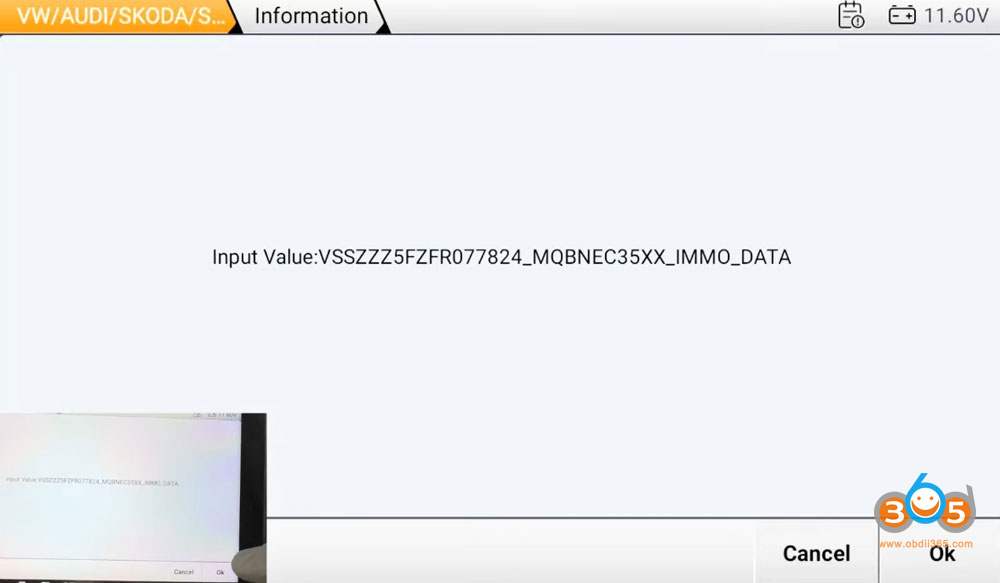
We will demonstrate the process of adding a new aftermarket key to a 2015 SEAT Leon built on Volkswagen’s MQB platform using OBDSTAR X300 Classic G3.
The process for adding a key to this generation of MQB vehicles (VDO cluster) without disassembling the dashboard involves two main steps:
Reading Immobilizer Data (Immo Data):Read the vehicle’s immobilizer data from the instrument cluster. This data is essential for preparing the new key.
Preparing and Programming the Key:generate dealer key and learn key.
Tools used:
OBDSTAR X300 Classic G3
Xhorse Dolphin XP-005L
MQB non-keyless key blank
Procedure:
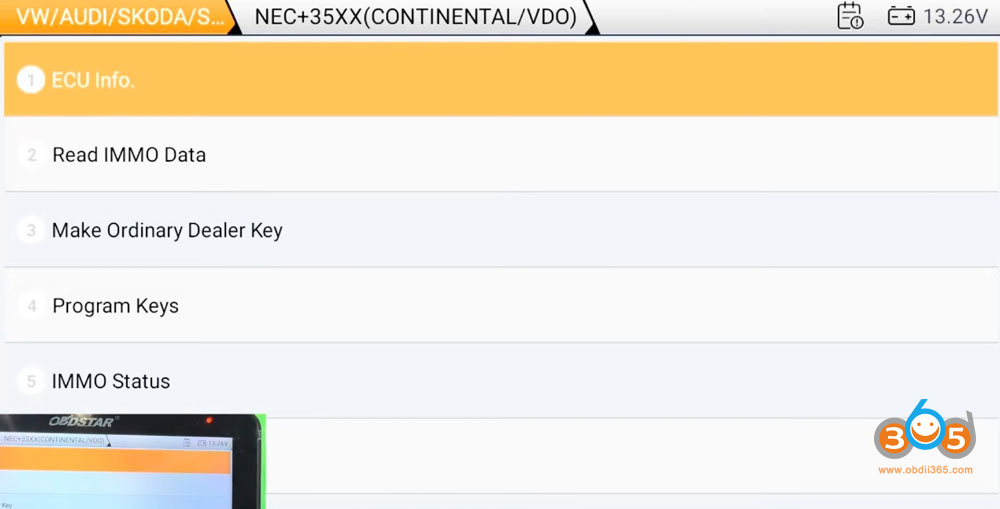
Select VW/Audi/Skoda/Seat- Seat- Leon- 2013 up- MQB dashboard- NEC35XX Continental/VDO


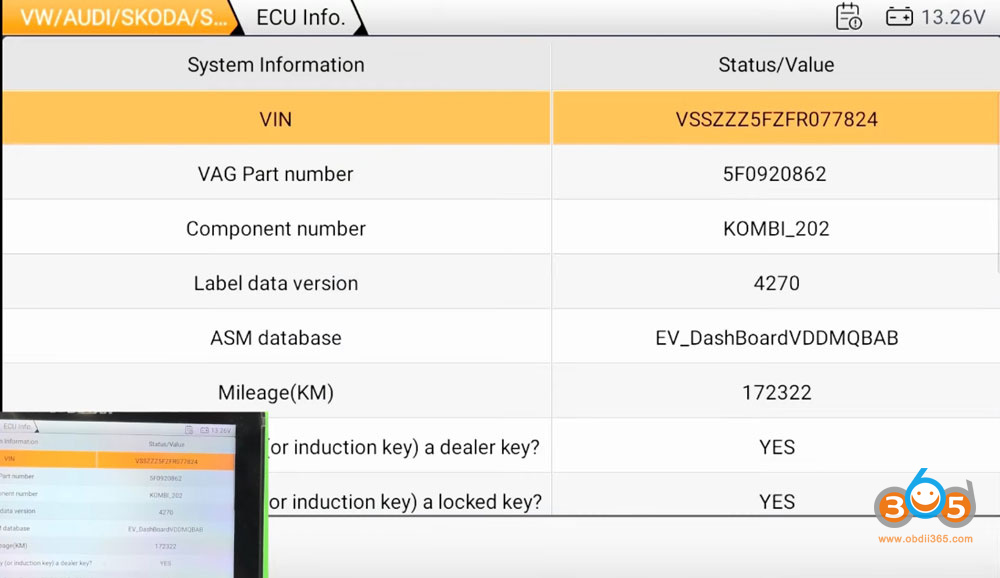
Read ECU info.

OBDSTAR G3 will read vehicle and key information.


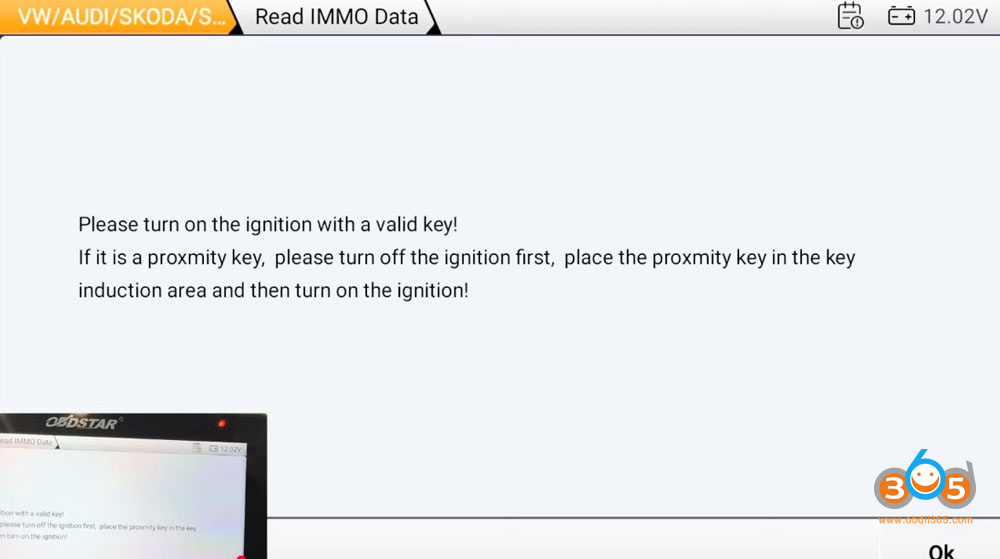
Read IMMO data.
Turn on the ignition with a valid key.


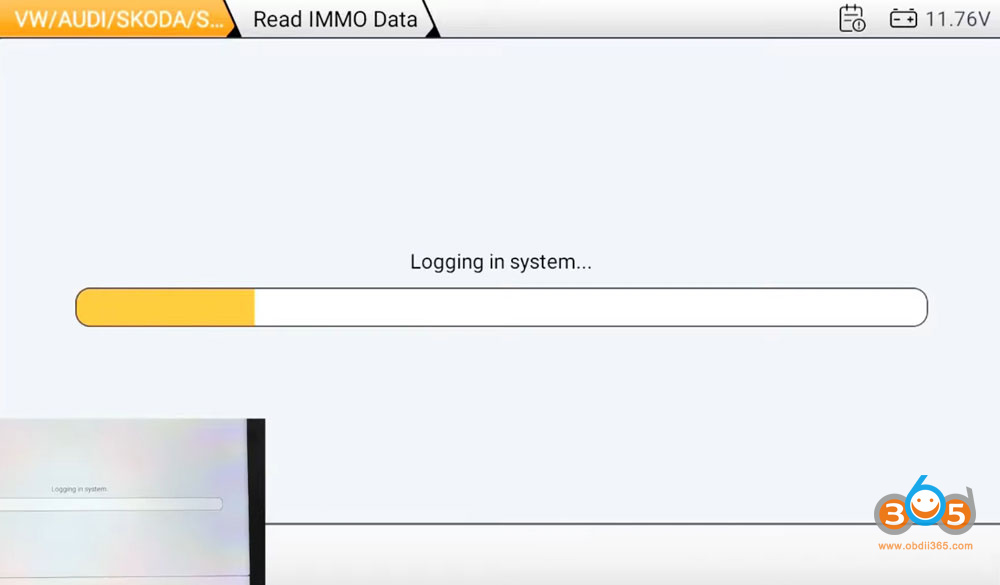
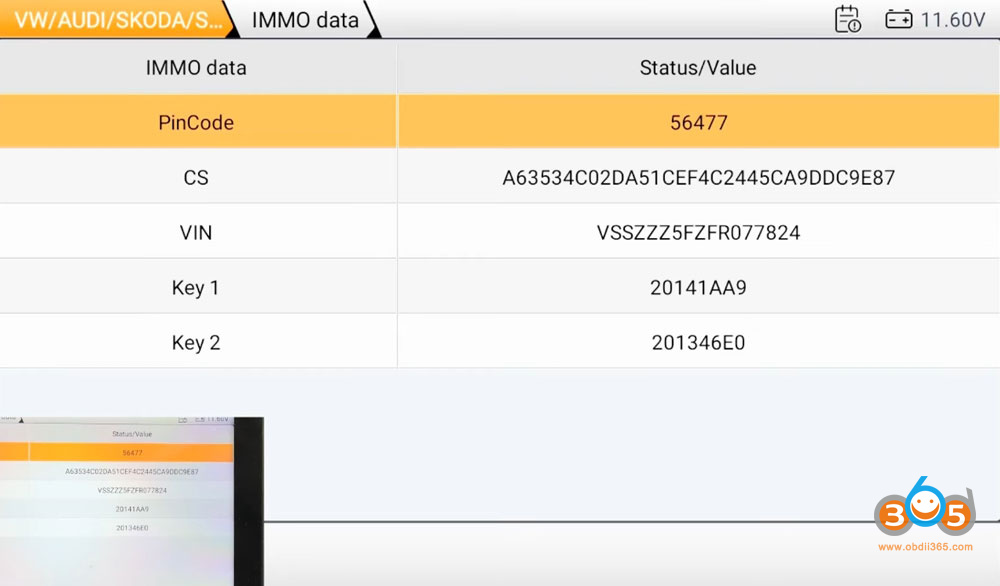
Read IMMO data successfully. OBDSTAR G3 will display CS, VIN and pin code.

Select Make dealer key function.
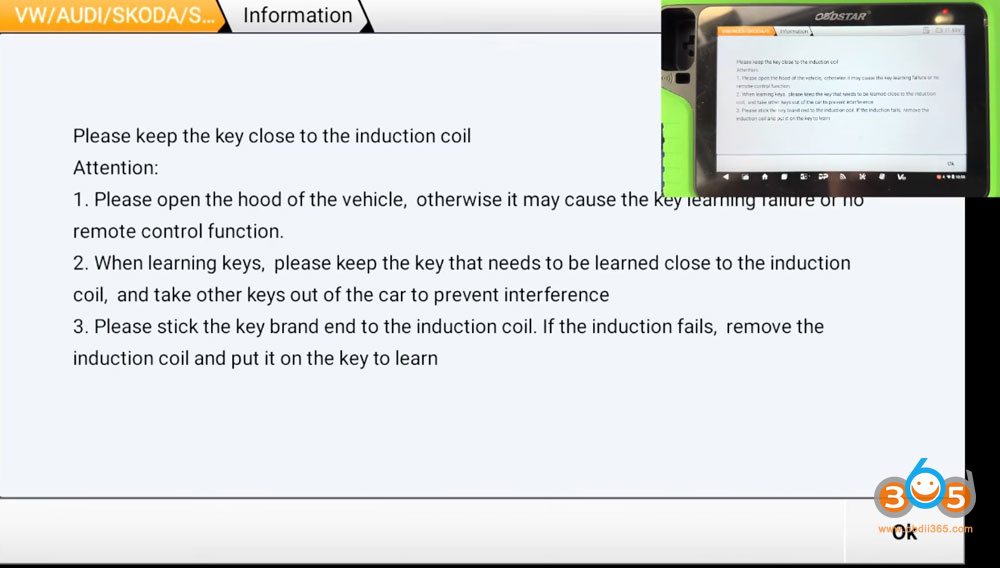
Place the original key into the key sensing coil.
Then place a new key to the key sensing coil to make dealer key.


Learn key.
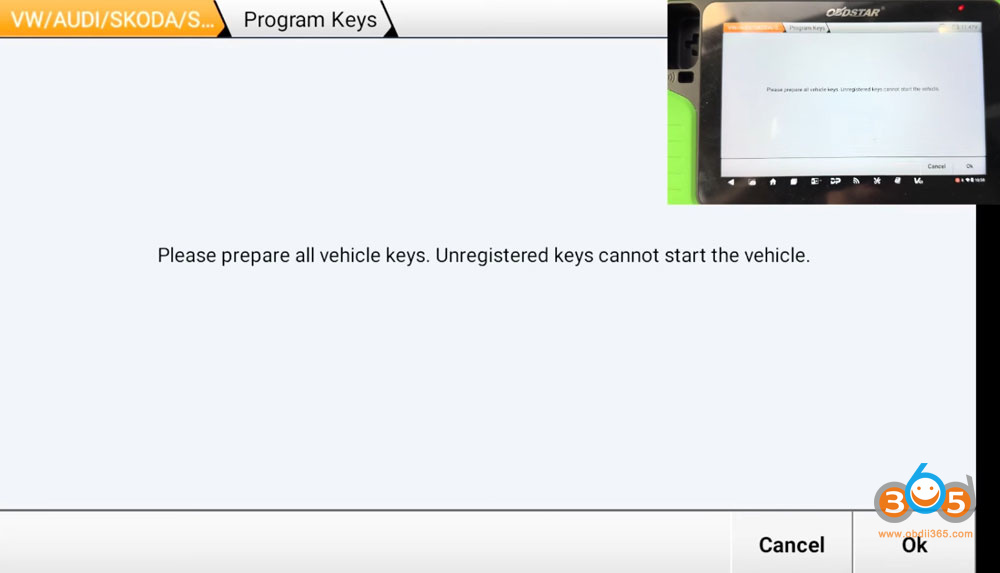
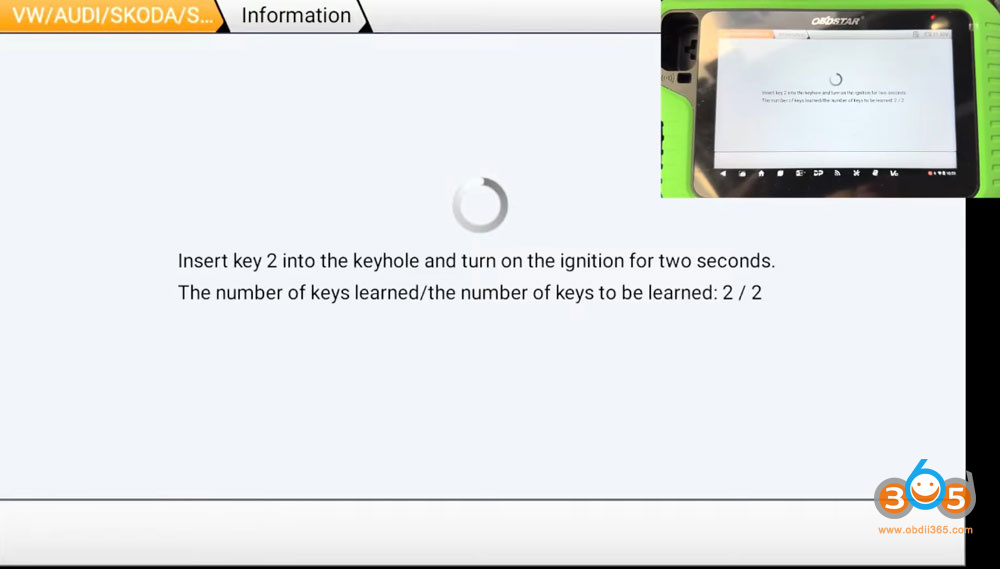
Follow the system prompts to learn all keys to car.


Done.
Posted by: jean at
06:51 AM
| No Comments
| Add Comment
Post contains 191 words, total size 15 kb.
October 24, 2025
Tutorial: set up and useTopdon Rlink J2534/Rlink X7interface with Ford Forscan software.
Connect the RLink J2534 or X7 device to the vehicle.

Connect the RLink device to the diagnostic computer via a USB cable

Download Rlink Platform driver. Activate the RLink device and download the Ford driver.

Double-click to open the FORSCAN software. If you need to use the Forscan programming version software, please contact Forscan official customer service.

Click the Settings button, selectConnections, set theJ2534mode, and choose theRLinkconnection mode

Select the vehicle icon in the software, then click the vehicle identification to access the vehicle diagnosis.

Click the DTC button to read the relevant trouble codes and clear the read trouble codes.

Example: program the Ford BCM control unit with Rlink and Forscan.
Click theProgramming Modeicon, select the BCM (the module to be programmed), and click the Start button at the bottom left corner to enter the programming page.

Click theDownloadbutton to download the BCM programming data.

If the programming file is downloaded successfully, the information of the downloaded programming file will be displayed.

Once the programming data download is complete, you can directly click the Programming button to start programming

After programming is completed, encode the vehicle configuration, then clear the trouble codes and test the vehicle.
Note: Replacing the BCM module requires anti-theft configuration. Before programming the BCM using FORSCAN, it is recommended to confirm with FORSCAN official support whether the subscribed permissions include anti-theft configuration and which vehicle models are supported.

Posted by: jean at
08:00 AM
| No Comments
| Add Comment
Post contains 253 words, total size 12 kb.
October 23, 2025
It’s a Ford Transit 2.0Tdci with SID211 ECU. The car owner flashed his car via OBD and something happened because there was no communication with ECU.
No further communication with Ecu no reading or writing further allowed.
You need to recover this ECU in boot mode.
Boot mode involving separating the ecu from the case with both sides of the motherboard needing a connection, soldering a boot line under the capacitor and a top level connection.
Full read allowed including map area and eeprom and then a full install of stock software & the back up eeprom fil which was corrupted during the obd programming.
Magic Motorsport Flexwill recover this ECU in boot mode.
Flip the board from the Ecu case with glue on the underside and on the top of the resistors an absolute ball ache to seperate however patience and being carefull it can be done
With 2 boot pads on the PCB one on the top and one under the capacitor that needs lifting out of its cradle
A full restore is then performed restoring all communication.


Foxflash also recovers this ECU by boot.


Posted by: jean at
09:51 AM
| No Comments
| Add Comment
Post contains 226 words, total size 6 kb.
October 22, 2025
Good news! AllTopdon Rlink J2534&Rlink X7users get1 year of Topscan Pro App accessFREE ($99 value). Scan, reset, and repair straight from your phone.
You’ll Get:
- Mobile Diagnostics Anywhere: Run full-system scans across 120+ brands without booting up a PC.
- One-Tap Maintenance Resets: Oil, battery, EPB, SAS, TPMS, and more done in seconds.
- Instant AutoVIN & Reports: Quickly ID vehicles and share professional reports with customers.
- Bi-Directional Tests & Live Data: Command components directly and confirm repairs on the spot.
- Always Up-to-Date: 1 year of free updates keeps you connected to the latest models.

How to claim your free benefit?
How to use Topdon RLink J2534 X7 with TopScan Pro App?
Main steps:
1. Download and Install the App
2. Register and Log In 4
3. Bind and Activate the Device
4. Download the Vehicle-Specific Diagnostic Software
5. Perform Diagnostics
1. Download and Install the App
Method 1:
For iOS: Search for "TopGuru” in App Store to download and install.
For Android: Search for "TopScan” in Google Play to download and install.
Note: This app is compatible with iOS 11.0 or later/Android 7.0 or later.

Method 2:
If you cannot download the app from any app store, try downloading itdirectly from Topdon official website:
https://www.topdon.com/pages/pro-down?fuzzy=TopScan
2. Register and Log In
Launch the app and tapCreate Account.Enter your email address,password and verification code to register. If you already have an account,you can sign in directly using your email address.

3. Bind and Activate the Device
Method 1:
1). After logging in, locate the DLC (Data Link Connector) of your vehicle,and plug the device into the DLC following the on-screen instructions.
Note: The device must be connected to the DLC via its OBD-II port or to a powersource via its USB-C port to enable Bluetooth connection.
(The screenshot below is for demonstration only; the actual product and appinterface shall prevail.)

2). Turn on Bluetooth on your phone, then tap Next. Turn the ignition to the"ON” position and confirm that the indicator on the device lights solidred. Tap Next to search for the device via Bluetooth.
3). Find the device namedRLinkand tap it to connect.
(The device Bluetooth name combines the device model and the last four digitsof its serial number. For example, RLink_J2534_014F.)

4). After the software automatically retrieves the serial number (SN) andthe activation code, tapActivate.
(The screenshot below is for demonstration only; the actual product and appinterface shall prevail.)

Note: For iOS devices, you need to connect manually after being redirected tothe access permissions screen.
Procedure:
Settings Bluetooth Tap in the top-left corner, then tap to open theBluetooth list.

Method 2:
TapMe > Device Management > Add VCI.
(The screenshot below is for demonstration only; the actual product and appinterface shall prevail.)

Tap the VCI in the top-right corner to connect via Bluetooth. If aconnection is established, the serial number and activation code will beautomatically retrieved.
Note: The device must be connected to the DLC via its OBD-II port or to a powersource via its USB-C port to enable Bluetooth connection.

TapActivate.
4. Download the Vehicle-Specific DiagnosticSoftware
For first-time use, you need to download the required vehicle-specificdiagnostic software before performing diagnostics.
Tap Diagnostics from the home screen and download the desired software.

5. Perform Diagnostics
Prerequisite
1). Locate the DLC of the vehicle can connect the device to the DLC.
If you cannot find the DLC, tap Repair Information > DLC Location, and choose the vehicle make, model and year. A picture of DLC location for the selected vehicle will display.
Note: Make sure the ignition is OFF before plugging in the unit.

2). Turn the ignition to the "ON” position. If your vehicle is equipped with akeyless start system with an "Engine Start Stop” button (see the figurebelow), press the "Engine Start Stop” button until the car is in "ON” mode.
Do not apply the brake while pressing the button, or the engine will startinstead of switching to the "ON” position.
Note: The method of ignition varies by vehicle model. Refer to the vehicle’sservice manual for details.
Procedures:
1). Launch the app, tap Diagnostics to view the diagnostic software list.

2). Select your vehicle make. (Tip: You can also enter the make name tosearch. The figure below uses Nissan as an example.)
Note: If the Bluetooth is not connected, tap VCI in the top right corner toconnect via Bluetooth. The connection is established when the device indicatorturns solid blue and VCI is displayed in the app interface.

3). Tap Automatic or Manual to identify your vehicle.
Note: The Automatic option may be not available for some old models. In this case, tap Manual, choose the vehicle make, model and year, then check your vehicle information.
Tap Read to retrieve the vehicle VIN (Vehicle Identification Number).
Note: Some models do not store VIN in the ECU, so the software cannot read it.
Under such circumstances, manually enter the correct VIN.
Tap Confirm after you verify that all of the information is correct.
Tap Auto scan
Tap Scan to run full system diagnostics.

Posted by: jean at
06:44 AM
| No Comments
| Add Comment
Post contains 842 words, total size 9 kb.
October 21, 2025
Keydiy KD-MP toolMQB48 key data calculation function is ready in October 2025.
Requirement:
Update KD App toV1.52and newer
MQB48 function activation requires2500 KD coins or 75USD.(MQB48 function shares the same license as Audi BCM2.)
MQB48 key operation takes200 KD coins.
Require an original key.
A laptop with USB port
Same MQB48 coverage as Xhorse and KYDZ tools.

Step to calculate VAG MQB48 key data with Keydiy KD-MP:
Run KD MP tool App.
Go to MQB48 function.
Check wiring diagram.
There are 5 wiring diagrams for 5 differen types of MQB48 keys.

Connect the wires accoding to the marked positions inthe diagram.
The capacitor indicated by the yellow arrow must be removed and replaced with the provided capacitor.
Capacitor value:1.8PF

Connect key data collection cable with KD-MP unit. Connect KD-MP tool with 12V power supply.

Do not place the key directly into the induction coil.
You must insert a positioning tool and place the key at a specific height.
Otherwise, the data collection will fail.

Insert the positioning sponge (comes with packageto the coil, or insert a ball of paper, then place the original key board on the positioning sponge.

For this type of key, it needs to be placed vertically and inserted into any hole of the positioning sponge.


Then start to identify key and calculate key data.
Each MQB48 calculation will take200 KD coins.
Calculation failures do not deduct points, and identical calculation results under the same account will not incur repeated point deductions.
Calculation finished.
You will get a verification code.

The data can be used withKeydiy KD-X4and other MQB device to geneate key and learn key.
Open file on the cloud, copy and paste data to other device.
http://blog.obdii365.com/2025/10/20/how-to-calculate-vag-mqb48-key-data-with-keydiy-kd-mp-tool/
Posted by: jean at
06:23 AM
| No Comments
| Add Comment
Post contains 290 words, total size 10 kb.
October 17, 2025
Read and write VW Golf MD1CS004 HW80 withAutoTunersuccessfully.
Model:Volkswagen Golf 2020 VIII
ECU Type: Bosch MD1CS004 HW80
Mode: OBD VR
Not every HW80 can be read.There are still some bootloader which are locked.
Important note :
After unlocking the ecu it will throw an error.
What to do:
Don’t ever switch ignition OFF ( KEEP IT LIKE IT IS)
Then u just choose same file and reflash.
autotuner will tell „ecu already unlocked" and will flash straight away.


Posted by: jean at
07:22 AM
| No Comments
| Add Comment
Post contains 87 words, total size 2 kb.
32 queries taking 0.2477 seconds, 213 records returned.
Powered by Minx 1.1.6c-pink.