August 29, 2025
Keydiy also released an Audi IMMO5 encryptedBCM2 solder free adapterkit forKD-X4key programmer to program Audi BCM2 smart key without soldering.
Here we will show how to install the Keydiy Audi BCM2 adapter.
Keydiy BCM2 adapter kit has two interface boards for D70F3634 and D70F3635 processors.
Two adapters are each equipped with two card slot fasteners.
There is also a cable connecting the interface board and the KD-X4, along with some fixing pillars used to secure the interface board and the BCM2 module.

Select the corresponding interface board based on the processor chip.
It is essential to choose the correct cboard.
Takes D70F3635 board as an example.


First, remove the two fasteners.

There are three holes on the back side of the BCM2 module.

Secure these three holes using the fixing pillars.

Align the three holes of the interface board with the three fixing pillars on the module.

Press the BCM2 interface board downward.
Continue installing the fixing pillars.
Then, fasten the board fasteners.
The shorter side should be on top, and the longer side should be at the bottom.


After installing the interface board, connect it to the KD-X4 device via the cable in the package.
Connect theKD-X4to a mobile phone using an OTG cable, and use the app to operate the software and read data from the BCM2 module.

https://www.obdii365.com/service/how-to-install-keydiy-audi-bcm2-solder-free-adapter.html
Posted by: jean at
07:49 AM
| No Comments
| Add Comment
Post contains 228 words, total size 4 kb.
August 28, 2025
Good news for Launch Smartlink Super Remote Diagnosis users!
From August 27 to November 27, 2025, owners of X-431 tablets (X431 PAD V/X431 PAD VII/X431 PRO5 smartlink) andSmartLink Cdevices in selected countries/ regions can access professional remote diagnostics service—including SME data recovery, hybrid conversions, power upgrades, retrofitting, and more.
To claim:
1. Log in at smartlink.x431.com
2. Activate Super Remote Diagnosis
3. Email your device serial number to overseas.service@cnlaunch.com
Who will provide the Super Remote Diagnosis service during the period?
Launch official technicians/engineers.
What does it include?
BMW
- BMW SME Data recovery
- convert hybrid to gasoline
Mercedes-Benz
- Stage 1 power upgrade
- Stage 2 power upgrade
- Retrofit, modification and configuration upgrade.

Who can join this service?
Available to owners of Launch X431 tablets and Smartlink C devices with remote diagnosis functionality in these regions
- Indonesia, Sri Lanka, Bangladesh, Malaysia, Singapore, Timor-Leste, Brunei.
- Cambodia, Laos, Myanmar, Vietnam, Philippines, and Thailand.
- Japan and South Korea

Smartlink Super Remote Diagnosis Service detailed model and function list:

Posted by: jean at
07:56 AM
| No Comments
| Add Comment
Post contains 175 words, total size 4 kb.
August 27, 2025
Question:
CanLaunch X431 IMMO Plus/IMMO Elitedo VW Instrument immo key with pogo pin without reading from chip? Like say 2013 VW Jetta flip key. Autel can do it via Pogo pin and plug method and this can save some time.
Here is the clue.
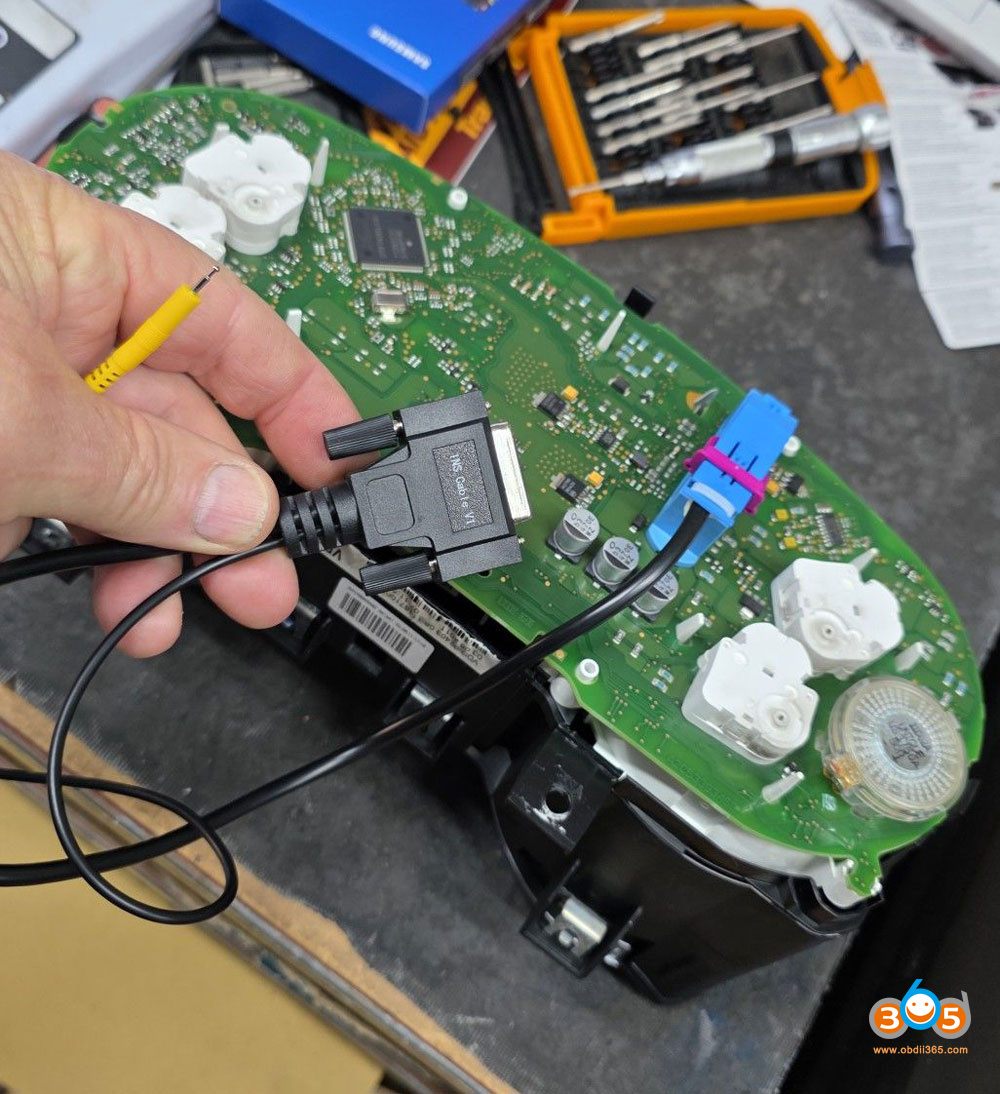
This comes with a pogo pin. There is a pogo cable in the box when you get it.

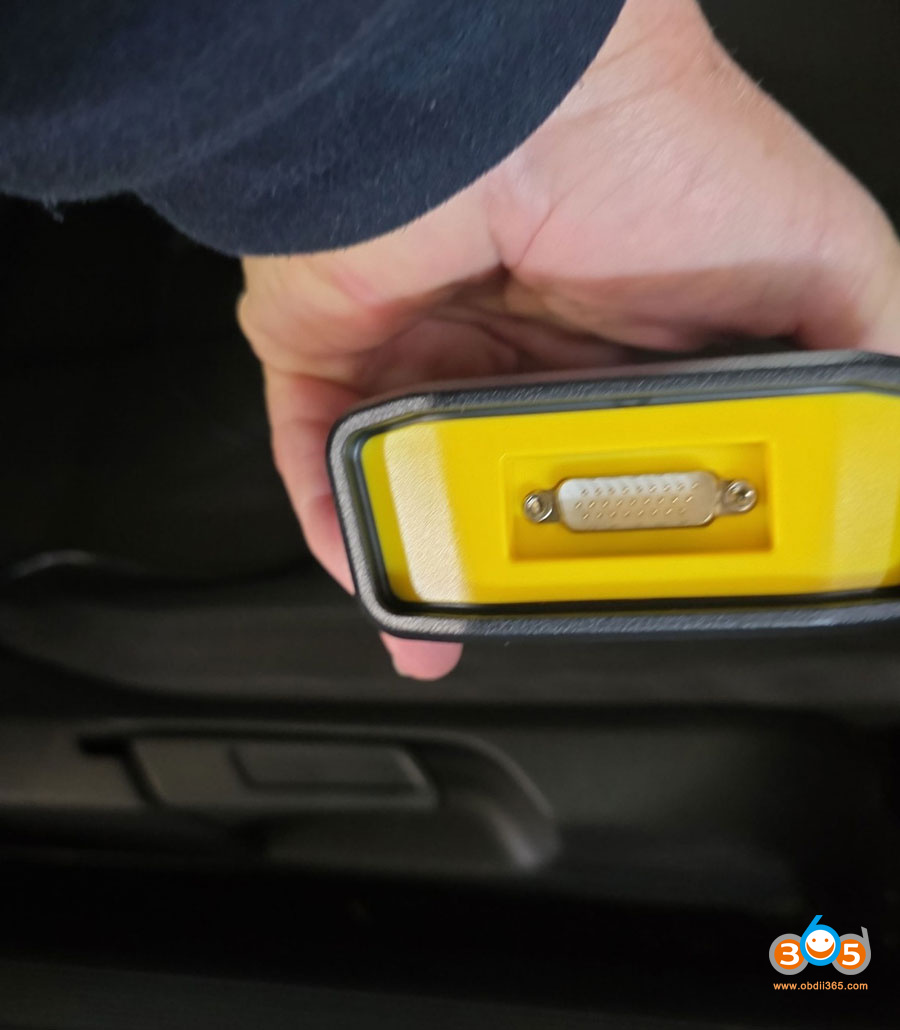
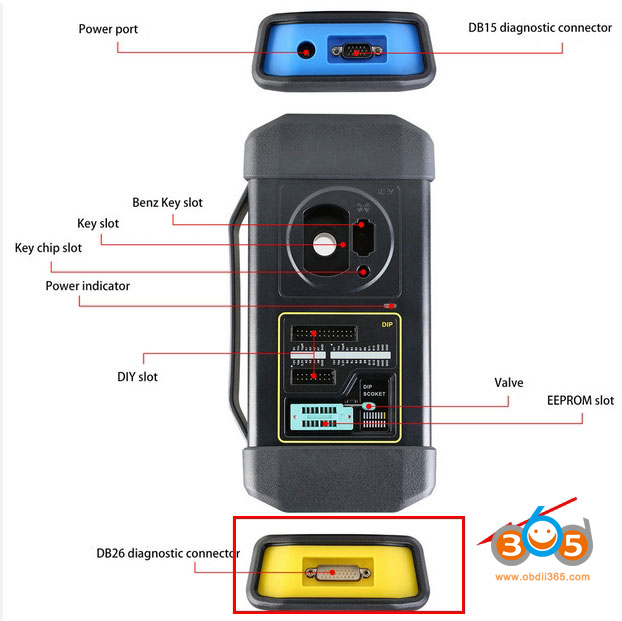
This pogo cable connects to the xprog 3 yellow port (the DB26 connector).


User feedback:
It worked it out finally. This pogo cable does indeed connect to the xprog 3 yellow port. But doing so when connected to the car with old port powers up the instruments. So you need to find the pogo point, then touch and hold pogo on point while connecting to xprog3 the instrument should now enter service mode.
Hold the probe on the boot point, power on the cluster, you can then retrieve the immo data. After retrieval of immo data, put cluster back in car and turn ignition on before doing dealer key and learn key. Done successfully.

FYI:
Be careful when using pogo pin method. If you use the wrong pin it can cause corruption on clock.
Posted by: jean at
06:14 AM
| No Comments
| Add Comment
Post contains 206 words, total size 5 kb.
August 26, 2025
What is the difference between 2025 new Launch X431 CRP919X Lite and the CRP919X BT/CRP919E BT?
Check table comparison here:
| Product | Launch CRP919X Lite | Launch CRP919X BT |
| Image |  |
 |
| Price | $259 | $389 |
| Operating System | Android 8.1 | Android 10.0 |
| Processor | 1.3 GHz (unspecified exact cores) | 4-Core 2.0GHz |
| Memory (RAM + Storage) | 2 GB RAM + 32 GB ROM | 4 GB RAM + 64 GB ROM |
| Battery | 6000 mAh | 6300 mAh |
| Display | 7-inch touch screen (1024×600 resolution) | 7-inch touch screen (1024×600 resolution) |
| Connectivity | Standard wired OBD-II interface; Wi-Fi updates | Bluetooth via DBScar VII wireless VCI |
| Key Diagnostic Functions | All-system diagnostics, bidirectional control, 32+ reset functions | All-system diagnostics, bidirectional control,35+reset functions, key programming & more |
| Protocols | Full OBD-II support, broad brand/model coverage (1996–2024) | CAN-FD, DoIP, ECU coding, FCA AutoAuth, wide protocol support |
| Auto VIN / Auto Scan | Supported – auto VIN & full-system scan | Supported – one-click AutoVIN & AutoScan |
| Extended modules | BST360; VSP-600; TPMS Tool; |
BST360; VSP-600; TPMS Tool X-PROG3; X431 DoIP 16Pin Cable; X431 key programmer; Non-16 Pin Adapter Kit; Launch Motorcycle Diagnostic Connector Kit 2.0 with Software License |
| Update | 2 years free update; After 2 years, need to buyupdate service€150.00/year | 2 years free update; After 2 years, need to buyupdate service€150.00/year |
| Language | English, French, Spanish, German, Italian, Russian, Portuguese, Japanese, Korean, Polish | English, French, Spanish, German, Italian, Russian, Portuguese, Japanese, Korean, Polish |
| SGW License | No | Yes, support VAG SGW, FCA SGW |
| Additional Highlights | Covers 99% of mainstream OBDII vehicles; includes online repair database and active bidirectional tests | Faster hardware, wireless convenience, integrated camera support, broader reset capabilities |
Key Similarities
- Display:Both feature a 7-inch touch screen with 1024×600 resolution.
- Update Policy:Include 2 years of free software updates; renewal costs €150/year afterward.
- Language Support:Multiple languages available: English, French, Spanish, German, Italian, Russian, Portuguese, Japanese, Korean, and
- Basic Diagnostics:Both support all-system diagnostics, bidirectional control, and auto VIN/auto scan.
- Included Modules:Both come with BST360, VSP-600, and a TPMS tool.
Differences:
1. Price:
CRP919X Liteis cheaper thanCRP919XBT
2. Operating System & Performance
CRP919X BT> CRP919X Lite
- Lite runs on Android 8.1 with a 1.3 GHz processor (unspecified cores).
- BT runs on newer Android 10.0 with a faster 4-core 2.0 GHz processor.
3. Memory
CRP919X BT> CRP919X Lite
- Liteoffers2GB RAM and 32GB storage.
- BTprovides 4GB RAM and 64GB storage for smoother operation and more data.
4. Battery Capacity
CRP919X BT> CRP919X Lite
- Lite has a 6000 mAh battery.
- BT features a slightly larger 6300 mAh battery.
5. Connectivity
Lite uses a standard wired OBD-II connection with Wi-Fi for updates.
BT supports Bluetooth connectivity through the DBScar VII wireless VCI for greater convenience.
6. Diagnostic & Reset Functions
CRP919X BT>CRP919X Lite
- Lite supports 32+ reset functions.
- BT supports over 35 reset functions and adds key programming capability.
- Protocol Support
7. CRP919X BT> CRP919X Lite
- Lite covers standard OBD-II protocols with broad vehicle coverage.
- BT supports advanced protocols including CAN-FD, DoIP, ECU coding, and FCA AutoAuth.
8. Included Accessories
CRP919X BT> CRP919X Lite
BTcan work with X-PROG3, DoIP 16Pin Cable, key programmer, non-16 pin adapter kit, and motorcycle diagnostic connector kitwhileLiteversion cannot.
9. SGW License
CRP919X BT can purchase FCA SGW license and VAG SGW license, but CRP919X Lite cannot.
10. Additional Features
BT model offers integrated camera support and enhanced wireless functionality.
BT has faster hardware better suited for advanced diagnostics and programming tasks.
Purchase Recommendation
ChooseLaunchX-431CRP919X Liteif:
- You need a cost-effective diagnostic tool for standard OBD-II vehicles.
- Wired connection is sufficient for your workflow.
- Your focus is on essential diagnostics and resets without advanced programming.
ChooseLaunchX-431 CRP919X BTif:
- You prefer wireless operation for greater flexibility.
- You require advanced functions like key programming, ECU coding, or motorcycle diagnostics.
- You value better performance (faster processor, more RAM) and future-proof protocol support (DoIP, CAN-FD).
- The included accessories (X431 X-PROG3,key programmer, etc.) are relevant to your services.
- Work on FCA or VAG vehicle, can purchase the corresponding SGW license in the Mall.
Posted by: jean at
06:06 AM
| No Comments
| Add Comment
Post contains 648 words, total size 9 kb.
August 25, 2025
Problem:
When generating emergency key for 2024 Toyota tundra with the Lonsdor lt20 board set to "BA” and Pke frequency 314.35:312.09. After reading immo data withLonsdor K518 Protry to generate emergency key using thelt20 boardand it says this now (error No valid key data found or PEPS is brand new). it was not saying this before. Any solution?

Solution:
It’s not the LT20 key problem.
Here is no valid key data in PEPS smart box.
The smart box of this car should have been reset and there is no key information. Enter this menu to reset the smart box.
Menu path:
IMMO & Remote- Toyota- Select from type- All smart key lost- Type 3 (2022-)- 8A- Reset PEPS (AKL).
If this menu does not work, it is not supported.

Posted by: jean at
06:19 AM
| No Comments
| Add Comment
Post contains 140 words, total size 3 kb.
August 21, 2025
Problem:
It’s a VW Polo 6R with Delphi DCM3.7 engine control unit ECU. No programmer seems to be able to read this ECU via pinouts (bench). Foxflash, KESS etc should read this ECU via OBD, but the ECU was removed from car. So tried to read ecu using theGodiag GT100 breakout boxvia OBD on bench. But FOXFLASH didn’t read the flash. Then tried to read this ECU with Scanmatic + pcmflash. Have managed to read it using the Godiag ECU box but cannot write it any further. There’s no problem reading, but writing is still impossible.
OBDSTAR DC706doesn’t support this ECU, andXHorse MultiPROGdoesn’t support this ECU for the VW Polo either. both devices support the same DCM3.7 for, for example, Kia/Hyundai/Sunyung, etc). If it works via OBD in the car, why doesn’t it work on the bench using ECUBOX? The ECU is identified but reading or writing isn’t possible? Any solution?


Solution:
It’s because immo is active, obd reading for that ecu requires immo to be connected.


Posted by: jean at
07:19 AM
| No Comments
| Add Comment
Post contains 235 words, total size 7 kb.
August 20, 2025
2023 Mazda Cx-50 add key successfully withAutel IM508.
Autel Im508 under cx-30 (add key guided) will read P Flash, calculate passcode and add key. Use aftermarket key.
There was no cx-50 option and auto identify failed. But going under cx-30 worked liked a charm.

Posted by: jean at
06:45 AM
| No Comments
| Add Comment
Post contains 52 words, total size 1 kb.
August 19, 2025
Comparing the online programming capabilities of the TOPDON Phoenix series and the Launch X431 PAD series requires examining their respective features, supported brands, and overall performance for ECU programming and coding. Below is a detailed comparison based on available information, focusing on online programming differences and which tool may be better suited for this purpose. Note that online programming refers to the ability to connect to a manufacturer’s server to perform tasks like ECU flashing, coding, or parameter adjustments, typically requiring an internet connection and specific protocols like J2534.
Comparison of Online Programming Capabilities
|
Feature |
||
|---|---|---|
|
Supported Brands for Online Programming |
Supports up to13 brandsfor cloud-based ECU programming, including Benz, BMW, VW, Audi, Skoda, Seat, Porsche, Jaguar, Land Rover, Nissan, Infiniti, Subaru, Renault, Hyundai, Kia. |
Supports a broader range of brands on higher-end models like PAD V/PAD VII, including BMW, Benz, Jaguar, Nissan, Renault, Land Rover, Subaru, Hyundai, Infiniti, Kia, Porsche, VW, Audi. Lower-end models likePRO5 is limited toBMW and Benzonly. |
|
J2534 Pass-Thru Support |
Most Phoenix models (Xlink, Smart, Max, Remote) supportJ2534 pass-thrufor OEM programming, enabling access to manufacturer-specific software. |
Pro5/PAD series (with Smartlink 2.0) supports J2534 pass-thru with advanced protocols like D-PDU, RP1210, CAN FD, and DoIP for newer vehicles. |
|
Cloud-Based Programming |
Phoenix series offers cloud-based programming for 13 brands, eliminating the need for OEM software in many cases. This is a standout feature for ease of use. |
Launch PAD series relies more on direct OEM software integration via J2534 for programming, with cloud-based features less emphasized.PAD VII supports more brands for online parameterization and coding(e.g., VW, Audi, Renault). |
|
Vehicle Coverage |
Covers over 130 light trucks and cars, plus 80 truck models with optional heavy-duty software. Strong for European vehicles (e.g., Porsche, VW, Audi). |
Extensive coverage across OBD1 and OBD2 vehicles, including FCA, VAG, and heavy-duty trucks (with separate HD module). PAD VII excels in broader vehicle support. |
|
Special Functions |
Supports 41+ service functions, full-system diagnostics, and topology maps. ECU coding and FCA AutoAuth are standard across models. |
PAD VII offers 50+ reset functions, bi-directional control, and super remote diagnostics. PRO5 supports fewer brands but includes advanced features like ECU coding and FCA AutoAuth. |
|
Hardware for Programming |
Phoenix Max and Smart feature larger storage (256GB) and battery capacity (15,000mAh), with Bluetooth MDCI Pro supporting CAN FD, DoIP, and J2534. Xlink uses wired diagnosis, lacking J2534 in some cases. |
PAD VII has superior hardware (larger RAM/ROM) and uses SmartlinkVCI for advanced protocols. |
|
Subscription Costs |
Generally more budget-friendly updates, with 2 years of free updates included. Subscriptions are simpler and less costly than Launch. |
Launch offers 2 years of free updates, but subscriptions are more expensive and complex, with add-ons available via a "mall” system. |
|
Ease of Use |
User-friendly interface, praised for simplicity and U.S.-based customer support. Cloud-based programming reduces complexity. |
Launch’s interface is powerful but can be less intuitive, with support varying by region (U.S. support may be less responsive for global models). |
|
Remote Diagnostics |
Phoenix Max and Remote support remote diagnosis mode, but Xlink and Smart do not. |
PAD VII and PRO5 (with SmartLink C) support super remote diagnostics, a feature not available on all Phoenix models. |
Key Differences in Online Programming
Software:
Software is pretty much the same.
Launch will always have the latest update first.
Brand Coverage:
TOPDON Phoenix Series: The Phoenix series, particularly models like Phoenix Smart, Max, and Remote, supports online programming for up to 13 brands, making it more versatile for workshops handling diverse vehicles, especially European and Asian brands. The cloud-based programming feature is a significant advantage, as it simplifies the process by not requiring direct OEM software access for many brands.
Launch X431 PAD Series: The PAD VII is the most capable in the series, supporting online programming for a wider range of brands compared to PRO5. The PAD series relies more on J2534 pass-thru and OEM software for programming tasks.
Launch supports more add-on modules than Topdon It will also generate Launch universal remote keys/chips and program keys with X-prog3 (and IMMO software pacakge).
Protocol Support:
Both brands support J2534 pass-thru, which is critical for accessing OEM software. However, Launch’s Smartlink VCI supports advanced protocols like CAN FD and DoIP, making it better suited for newer vehicles. TOPDON’s MDCI Pro supports these protocols on Smart and Max models but not on Xlink.
Cost and Updates:
TOPDON: Offers more budget-friendly subscriptions and 2 years of free updates, with a simpler update structure. This makes it more cost-effective for long-term use.
Launch: Subscriptions are more expensive and complex, with add-ons available through a "mall” system that can lead to unnecessary purchases. However, Launch provides 2 years of free updates, similar to TOPDON.
Support and Reliability:
TOPDON: Praised for excellent U.S.-based customer support, quick response times, and a user-friendly interface. The brand is newer but rapidly gaining trust. Topdon is definitely better customer service. If something wrong with scanner he will quickly fix it or something not working . Send feedback and engineers will shortly fix it. He cares about customer satisfaction
Launch: A more established brand, but support can be inconsistent, especially for global models purchased outside official U.S. channels. Some users report issues with reliability for certain vehicles (e.g., Opel).
Which Tool is Better for Online Programming?
- TOPDON Phoenix Seriesis the better choice for online programming if:
- You need to program a wider range of brands (up to 13, including European and Asian vehicles like Porsche, Jaguar, and Nissan).
- You prefer cloud-based programming for simplicity and cost savings, avoiding the need for multiple OEM software subscriptions.
- Budget-friendly updates and strong customer support are priorities.
- You work primarily with light trucks, cars, and some heavy-duty vehicles (with optional software).
Recommended Models: Phoenix Smart, Phoenix Max, or Phoenix Pro for their robust online programming capabilities and cloud-based features.
- Launch X431 PAD Seriesis the better choice for online programming if:
- You require advanced protocol support (CAN FD, DoIP) for newer vehicles and prefer J2534 pass-thru for OEM software integration.
- You need super remote diagnostics or work with a broader range of vehicles, including heavy-duty trucks (with HD module).
- You prioritize a more established brand with extensive vehicle coverage, especially for complex diagnostics beyond programming.
Recommended Model: Launch X431 PAD VII, as it supports more brands for online programming than the PRO5 and offers superior hardware and features.
Recommendation:
Foronline programming specifically, theTOPDON Phoenix series(particularly Phoenix Smart or Max) is generally the better choice due to its broader brand support (15 brands vs. PAD VII’s fewer brands), cloud-based programming capabilities, and more cost-effective updates. The cloud-based approach simplifies the process and reduces reliance on OEM software, making it ideal for workshops handling diverse vehicles, especially European and Asian brands.However, if you need a tool foradvanced diagnostics and programmingacross a wider range of vehicles, including newer models with advanced protocols, or if you prioritize remote diagnostics, theLaunch X431 PAD VIIis superior due to its robust hardware, broader vehicle coverage, and support for additional features like super remote diagnostics. The trade-off is higher subscription costs and a potentially less intuitive interface.Final Verdict
- Best for Online Programming:TOPDON Phoenix Smartor Max, for their extensive brand coverage and user-friendly cloud-based programming.
- Best forOverall ProfessionalUse:Launch X431 PAD VII, for its advanced hardware, broader vehicle support, and additional diagnostic features.
If your primary focus is online programming with cost efficiency and ease of use, go withTOPDON Phoenix Smart or Max. If you need a more comprehensive tool for professional diagnostics and are willing to invest in subscriptions, choose theLaunch X431 PAD VII. Always verify vehicle coverage and specific programming needs with the manufacturer’s official website or support before purchasing.
Read also:
TOPDON Phoenix Series Product Comparison
Posted by: jean at
06:51 AM
| No Comments
| Add Comment
Post contains 1305 words, total size 13 kb.
August 18, 2025
WhileYanhua Mini ACDPsupports BMW BDC2 all-key-lost functionality, there are still critical considerations.

Here are the risk warnings.
1. This All-Key-Lost function isonly an emergencysolution and willaffect the BMW Dealer service. Please consider and note this before use.
2. This All-Key-Lost functionwill change the original vehicle IMMO info.If you want to restore original vehicle IMMO info in the future, you need to order a new key from BMW Dealer. Then restore the IMMO info with ACDP assistance.
3. This All-Key-Lost functiondoes not work on BDC2 electric and hybrid cars.
4. It does not change the ISN, it changes the eeprom. It resets bdc2, ecu and tcu. Issue is that if you do akl this way, owner will sell car, new owner would like to buy key from dealer, that official key will never work on car after acdp akl solution.
5. When performing All Keys Lost with ACDP the BDC2 will be locked. Keys bought from the dealer will not work and unless you are the original one that made a key no new keys can be added unless you contact ACDP and get them to restore the modules.
ACDP won’t accept any dealer key after this procedure. If the owner wants to order a key from BMW dealer, it cannot be used either.
Unless contact ACDP to restore the modules.
The AKL procedure must be done by ACDP to restore the original dealer key.
Recovery process after getting the dealer key:
Step 1: Read the BDC2 key
Step 2: Read the dealer key’s IMMO data
Step 3: Write the dealer key’s IMMO data back to the BDC2.
Step 4: Get in the car and program the dealer key (the ignition must be able to turn on)
Step 5: Write the DME ISN (the car can be started)
Step 7: Clear the transmission


Read also:
Posted by: jean at
07:22 AM
| No Comments
| Add Comment
Post contains 324 words, total size 5 kb.
August 15, 2025
TheTopdon Rlink J2534is a compact, affordable, and versatile pass-thru programming device designed for automotive technicians who need a reliable tool for vehicle module programming and diagnostics. In this detailed review, we explore the features, performance, and overall value of the Rlink J2534, based on real-world experiences. This review covers the unboxing, software installation, field performance across multiple vehicle brands, and final thoughts on its strengths and limitations.
Unboxing & First Impressions
The Topdon Rlink J2534 arrives in a well-packaged box, protected by a plastic wrapper during shipping, ensuring it reaches the user in pristine condition. Inside the box, the device is housed in a high-quality zippered case, which adds a layer of durability and portability for technicians on the go. The package includes:
- The Rlink J2534 device: A compact, well-built tool with a solid, quality feel.
- A USB-C cable:Features proprietary notches, making it unique to the device.
- A DLC (Data Link Connector) OBD extension cable:Useful for vehicles with awkwardly positioned diagnostic ports, preventing the device from interfering with pedals or other components.
- Instruction manual:Provides essential guidance on downloading and installing drivers, a critical step for ensuring proper functionality.
The build quality seems decent, and the plug-and-play design makes it easy to connect to a laptop and vehicle.


Setup & Software Installation
The software installation process for the Rlink J2534 is straightforward, thanks to Topdon’s intuitive software manager. Users can easily select and download the necessary drivers for specific vehicle manufacturers.
System Requirements
A high-performance laptop (Win10 is recommended).
Internet connection (required for driver downloads).
Installation Process
Download the RLink platform management drivers from TopDon’s website.
Install specific drivers (or other manufacturer drivers as needed).
Connect the device to the OBD-II port and laptop.
Launch diagnostic/OEM software.

The instructions provided in the manual are clear, guiding users through account registration and tool setup. However, there are a few points to note:
1).The process is straightforward, but there’s a potential conflict with other J2534 tools (e.g., Bosch MDI2, VCM2/3).
For example, with GM drivers installed, the Rlink caused Tech2Win (a GM diagnostic software) to crash. Uninstalling the Topdon drivers resolved the issue, but this workaround adds an extra step for technicians with multiple tools.
Tip: If you encounter issues with GM programming, try uninstalling conflicting drivers before using the RLink.
2).Driver Management: Topdon recommends usingonly one driver at a time,though it’s unclear how many can be installed simultaneously. This could be a minor inconvenience for technicians working across multiple vehicle brands.
Real-World Testing:
Tested theRlink J2534on different vehicles, covering a range of manufacturers and programming tasks. Below is a detailed breakdown of its performance:
1. Toyota Prius (2014 Prius V)
Task:Engine control module (ECM) software update.
Performance:The Rlink J2534 performed flawlessly, completing the update without any issues. The process was smooth, and the device demonstrated its reliability for Toyota vehicles.
2. Mitsubishi Outlander (2022)
Task:Update for the Intelligent Power Distribution Module (IPDM).
Performance:The Mitsubishi software worked seamlessly with the rlink J2534, completing the update without any hiccups. Highly satisfied with the tool’s performance on this vehicle.
3. Chrysler (Used Computer Replacement)
Task:Programming a used computer, including changing part numbers using Chrysler’s J2534 legacy app.
Performance:The rlink J2534 handled this task flawlessly, as well as a similar job on a 2011 Jeep Wrangler. The device proved reliable for Chrysler and Jeep applications, with no issuereported.
4. GM Vehicles (Buick Verano and 2011 Chevy Impala)
Tasks:
Buick Verano: Programming a fuel pump control module/chassis control module.
Chevy Impala: Vehicle theft deterrent module programming and immobilizer learn.
Cadillac Escalade (2021+): Body Control Module (BCM) Update, Oil Life & Crankshaft Position Relearn.
2012 Chevrolet Camaro V6: ECM & BCM Reprogramming and immobilizer relearn.
Performance:
Buick Verano: encountered repeated tool lock errors, requiring seven attempts to complete the programming.
Chevy Impala: While the initial tool lock was acquired quickly, the immobilizer learn required multiple attempts (five or six) before succeeding.
Cadillac Escalade: BCM successfully reprogrammed. Oil and crankshaft position relearn completed without issue.
Chevrolet Camaro : ECM & BCM reprogramming worked as expected. Immobilizer relearn completed in two minutes key cycles (standard GM procedure).
⚠️ Potential Issues With GM
Tool lock errors – Required multiple attempts to establish a connection.
Slow GDS2 communication – Noticeably slower than MDI2.
Tech2Win incompatibility – Would not work unless competing drivers were removed. Rlink’s GM drivers installed caused conflicts with the Bosch MDI2 driver, forcing to uninstall them to use other tools.

5. Honda Accord (2015)
Task:Powertrain Control Module (PCM) update using Honda’s i-HDS software.
Performance:
The rlink J2534 performed flawlessly, with no issues reported. Many Honda technicians also use the rlink daily for programming late-model and older Honda vehicles, including key programming and immobilizer tasks. Some of our customers report no problems, suggesting that Topdon has optimized its drivers for Honda applications.
Performance Notes:
⚠️ Requires Stable Power – A voltage stabilizer was used to prevent power fluctuations (critical for programming).
Final Verdict: Is It Worth It?
Pros:
This works with 13/14 auto manufacturers.
Affordable – One of the cheapest J2534 tools available.
Solid for Honda, Toyota, Mitsubishi, and Chrysler – Works reliably for most programming tasks.
Good backup tool – Useful when OE interfaces fail.
Lightweight & Portable – Easy to carry for mobile technicians.
Cons:
Proprietary USB-C Cable – If lost/damaged, replacements may be hard to find.
OBD Extension Cable Feels Unnecessary – Some users may prefer a direct connection.
GM compatibility issues – Requires workarounds for stable operation.
Only one driver at a time.
Best For:
DIYers & small shops – Independent mechanics needing a low-cost J2534 tool.
Backup for professionals – Handy when OE tools fail.
Honda/Toyota specialists – Works exceptionally well with these brands.
Conclusion:
TheTopdon Rlink J2534offers excellent value for technicians who don’t require high-end, manufacturer-specific tools. Its low cost makes it an attractive option for small shops or as a backup device. Its performance is rock-solid for Toyota, Mitsubishi, Chrysler, Jeep, and Honda vehicles, making it a valuable addition to a technician’s toolkit, especially for those who don’t perform frequent programming or need a cost-effective backup. However, its struggles with GM vehicles, particularly with tool lock errors and Tech2Win incompatibility, suggest that it may not be the best choice for shops heavily focused on GM diagnostics and programming. For technicians who can work around the GM issues—potentially by using a dedicated laptop or uninstalling conflicting drivers—the Rlink J2534 offers excellent bang for the buck.
The device’s overall performance and affordability make it a worthwhile investment for many.
Posted by: jean at
07:55 AM
| No Comments
| Add Comment
Post contains 1083 words, total size 12 kb.
32 queries taking 0.0522 seconds, 213 records returned.
Powered by Minx 1.1.6c-pink.