



June 13, 2025
Tutorial: How to set upTopdon Rlink X7/Rlink J2534 with Ford FDRS or FJDS OEM software.
1. Open the RLink Platform and clickLogin, it will automatically jump to the login screen upon the first use. Log in to the account bound to the RLink device.
Note: After binding and activating the device and downloading the driver, you can use the RLink device to perform vehicle diagnostics without opening the RLink Platform later.

2. Click the settings icon. Then clickAboutto check whether there is an update for the RLink Platform. If yes, clickUpdate.

3. ClickDriver Management>Driver Download. (Download the corresponding driver according to the OEM software. Do not download drivers that are not related to the OEM software.)
4. ClickFordand clickDownloadto download the driver.

5. ClickDriver Management>Driver Info. Then clickFordto check the driver mode.

6. When using RLink devices, selectRLinkas the diagnostic interface on the OEM software. If you are connecting to the original VCI or third-party VCI, open the OEM software and select the original VCI or third-party VCI as the diagnostic interface. This driver will not have any impact.

7. Double click the icon to open the FDRS.
8. Click the icon on the lower right corner. Click Other Device and choose RLink. Then click OK to continue.

9. Log in to the FDRS account.

If you use Rlink J2534 with Ford FJDS.
10. Double click the FJDS to start diagnostics.

11. Check the device driver on the FJDS.

12. Follow the orders in the figure below to select the device.

13. When the connection is successful, a successful connection message will be displayed.

14. Select vehicle for diagnostics after successful connection.

15. The system will detect the vehicle automatically.
Posted by: jean at
07:06 AM
| No Comments
| Add Comment
Post contains 291 words, total size 4 kb.
June 12, 2025
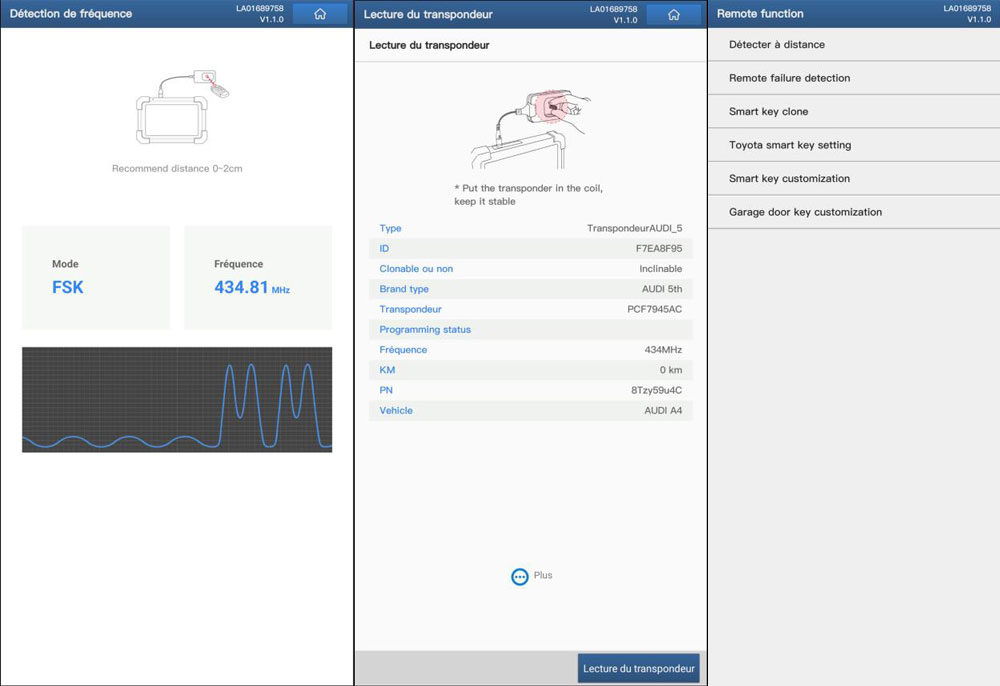
Can theLaunch X431 Key Programmerbe used with Diagzone and Xdiag software? Some users have conducted tests, and we’ll share their findings here.

Xdiag Pro3:
Xdiag PRO3 and the key programmer (Launch X431 IMMO Key Programmer) works!!
Had the Xdiag installed on a SAMSUNG GALAXY S22 ULTRA as well as the green GOLO probe and bought the key programmer… to be able to test and the news is conclusive.
Programmed by OBD via the IMMO function a key on AUDI S4 from 2012 and it works!

Diagzone:
It seems to work with Diagzone PRO.
It works the same way with diagzone.
Same menu as xdiag.
LvsScan Pro:
One of our customers bought the Launch Key programmer on the Redmi tablet and phone with LvsScan Pro. Works perfectly immo, transponder detection, cloning.
He made PSA keys (3008 / 207 /308 / 308 T9/ C5 2).
VW: AMAROCK / TIGUAN / GOLF 7/ AUDI A3 (201 .
.
RENAULT: LAGUNA 2 / CLIO 3 / CLIO 4 / MEGANE 3.
Some users have also reported negative results.
1. Didn’t succeed on Diagzone.
2. On Xdiag it’s average, don’t expect crazy things. And the icon disappeared from the tablet desktop after updating.
Do not attempt this lightly. Use at your own risk. The Launch X431 tablet is strongly recommended. For reference only. Use at your own risk.
Launch x431 immo pluswith xprog 3 and key programmer, it’s the best, frankly.
Posted by: jean at
07:42 AM
| No Comments
| Add Comment
Post contains 245 words, total size 4 kb.
June 11, 2025
Launch CRP919E BTandCRP919X BTsupportsBST360 battery testeradd-on module.
It is easy to use the BST360 with CRP919 series.
Go to Module- Toolbox- BST360
Select Battery Voltage Test.
Connect two clamps to battery module.
BST360 tester will connect with CTP919 BT via Bluetooth.
Start to test battery voltage and perform other battery related functions.


Posted by: jean at
07:20 AM
| No Comments
| Add Comment
Post contains 61 words, total size 6 kb.
June 10, 2025
Problem:
Launch X431 Pro5 with SmartLink. It is working for the main unit but he cannot connect the VCI smartlink C 2.0. Follow the instructions for set up. When he connects it, it shows the an error "Function is inactive or expired”.
.jpg)

Solution:
This error indicates that you have entered theSuper Remote Diagnosisinterface. To proceed, you must activate theSuper Remote Diagnosis activation cardand purchase aconnection card. This feature is compatible with devices equipped with SmartLink, such as theSmartlink C standalone,Launch X431 PAD V,PAD VII,PRO5,PRO3 V+ Elite,PRO3S+ Eliteseries.
NOTE: Super remote diagnosis is restricted in USA, Canada, Mexico, Australia, Brazil and Japan regions.
Follow guide here to activate remote diagnosis function of Smartlink.
How to Active Launch Smartlink C & Smartlink B Remote Diagnosis?
Posted by: jean at
07:35 AM
| No Comments
| Add Comment
Post contains 133 words, total size 4 kb.
June 09, 2025
Launch CRP919E, CRP919X, CRP123X V3.0 diagnostic scanners do not have built-in CAN FD protocol. To diagnose the latest GMs, you will need an extra CAN FD adapter.
Here we will show how to use and connect theCAN FD adapterwith these scanners.

NOTE:
CRP123X or CRP123 older version does not have CAN FD compatibility. Requires CRP123XV3.0.
CRP919E/X BT (the Bluetooth version) has built-in CAN FD protocol, does not need a CAN FD adapter.
How to connect Launch CRP919E/CRP919X/CRP123X V3 with CAN FD adapter?
Connect one end of the CAN FD adapter to the CRP919E/CRP123X V3 main cable.


Connect the other end of the CAN FD adapter to vehicle’s OBD socket.

If the indicator on the CAN FD adapter turns on, the connection is built.

Now auto detect VIN and read vehicle information.
For example, it is a 2021 Buick GL8. CRP123X V3 read VIN and vehicle information successfully.

Proceed with diagnostics.

Posted by: jean at
07:24 AM
| No Comments
| Add Comment
Post contains 160 words, total size 2 kb.
June 06, 2025
In this guide, we’ll walk through the process of performing anAll Keys Lost (AKL)procedure on a2023 Toyota Hilux using the Autel KM100 and an ikey universal key. This method is useful when the vehicle has no programmed keys left.
Tools Required
-
Autel KM100
-
Autel universal key
Step-by-Step Procedure
1. Generate the Universal Key
-
Open theAutel KM100tool.
-
SelectEurope(or the appropriate region).
-
ChooseToyota > Hilux > Hilux SV.
-
The tool provides three key generation options:
-
0182
-
0010
-
0011
-
-
Select0010and proceed with key generation.

2. Backup IMMO Data via OBD2
-
Connect theAutel VCIto the OBD2 port.
-
Navigate toIMMO Functions > IMMO Status Scan.
-
If no options appear, go directly toControl Unit > Keyless System CAN.
-
SelectBackup IMMO Data(this reads the Smartbox eeprom to generate a key).
-
Follow the prompts:
-
Turn on hazard lights(optional, can skip).
-
Press the start button 5 times(only pressing once also works).
-
-
The tool reads the data and saves it as a backup file (e.g.,2023_Hilux.immo).


3. Generate the analog key
-
Select theeeprom backup file(saved earlier).
-
Confirm the key type (SLK5).
-
The tool generates the key and asks to test it:
-
Place the key near the ignition button.
-
Attempt to start the vehicle.
-
-
If successful, proceed toAdd Smart Key.


4. Program the New Key
-
Go toAdd Smart Key(supports up to 5 keys).
-
Follow the prompts:
-
Remove the previously used key.
-
Place the new key near the start button.
-
Wait for confirmation that the key is learned.
-
-
Test the key:
-
Lock/Unlock(remote functions).
-
Start the vehicle(ensure wireless functionality).
-


5. Troubleshooting
-
If the remote doesn’t work initially,regenerate the key(poor internet signal can affect programming).
-
Ensure astable OBD2 connection(wired is preferred over Bluetooth).
-
If the vehicle doesn’t recognize the key,repeat the backup and key generation process.
Posted by: jean at
07:22 AM
| No Comments
| Add Comment
Post contains 292 words, total size 17 kb.
June 05, 2025
Launch CRP919E BT/CRP919X BTdiagnostic scanner now supports Launch X431 key programmer (key tool) add-on module.

We will show how to use/connect Launch X431 Key Programmer with CRP919E/X BT.
Go to Other Modules- Toolbox.
You can see the Key Programmer module.


There is a Type-C to USB-A Converter in the package.
Connect the converter with key programmer USB cable.

Insert the converter the USB port on the top of the CRP919E BT main unit.
Update key programmer if there is a new software/firmware/database version.
NOTE: Upgrade requires a network connection.

Then you can use the key programmer function to read transponder, generate transponder, generate remote, unlock Toyota smart key etc.


Posted by: jean at
07:36 AM
| No Comments
| Add Comment
Post contains 119 words, total size 2 kb.
June 04, 2025
What is the difference between Autel MaxiDiag MD808 Pro and 2025 new MD906 Pro?
Check the table comparison below:
| Model | Autel MD808PRO | Autel MD906PRO | |
| Hardware | VCI | Cable | V150Lite |
| System | Embeddedsystem | Android9 | |
| Battery | NA | 5000mAh | |
| Storage | 16G | 64G | |
| Screen | 4-inch | 5.5-inch | |
| Function | VehicleCoverage | CurrentyearvehicleofAsia,
Europe,America,China |
CurrentyearvehicleofAsia,
Europe,America,China |
| SystemCoverage | All | All | |
| Read/EraseCode | ● | ● | |
| LiveData | ● | ● | |
| SecurityGateway | NA | FCA,SFD,Nissan,etc. | |
| Service | OILRESET | ● | ● |
| BREAKBLEEDING | NA | ● | |
| INJECTOR | NA | ● | |
| SAS | ● | ● | |
| THROTTLE | ● | ● | |
| EPB | ● | ● | |
| BMS | ● | ● | |
| TPMS | NA | ● | |
| DPF | ● | ● | |
| AFSHeadlamp | NA | ● | |
| A/F | NA | ● | |
| Communication
Protocol |
CANFD | NA | ● |
| Software | FREELifetime
Software |
lifetimeoftool | lifetimeoftool |
MD906 Pro has a larger battery and storage memory.
MD906 Pro supports extra 5 special functions than MD808 pro, including SAS, Throttle, EPB, BMS, and DPF reset.
Posted by: jean at
07:38 AM
| No Comments
| Add Comment
Post contains 152 words, total size 3 kb.
June 03, 2025
Thinkdiag 2 and Ediag Plus: comparison and features
General characteristics
Both the Thinkdiag 2 and Ediag Plus are diagnostic adapters for cars designed to perform comprehensive diagnostics of various vehicle systems. These devices operate via the OBD-II (On-Board Diagnostic) interface and connect to ports in the car to read information and perform certain operations.
Appearance and hardware:
- Both adapters have a similar case design and hardware. This means that they are almost identical in design and technical capabilities.Protocol support:
- Connect to the car via a standard OBD-II connector.- Support multiple communication protocols such as ISO9141, KWP2000, CAN, J1850 PWM, VPW and others.
Software:
- The official software of both devices provides diagnostics of about 120 car brands and supports about 15 service functions.- Access to the programs is provided for 1 year after purchasing the device. After this period, the user loses access to most features, with the exception of basic diagnostics using the standard OBD II/EOBD protocol.
Main differences
Brand and Marketing:
- The main difference between the two devices is the brand. Thinkdiag 2 is a better known product in the market due to active advertising and support from the manufacturer.- Ediag Plus may be less popular, but it essentially offers the same features and characteristics.
Subscription price:
- Extending access to full functionality costs more than the original price of the adapter itself along with the software.Possibilities of connecting third-party software
Advantages of third-party programs:
To improve the functionality and expand the capabilities of both adapters, users often resort to using third-party software. Here are some popular options:-Diagzone:A program that can be installed directly "over the air", without the need for programmers. It significantly expands the functionality of the adapters, adding support for many additional car models and services.
-X-Diag:A program that supports diagnostics of cars and trucks, electric vehicles, as well as work with immobilizer systems (IMMO).
-ProDiag:Another popular alternative, offering a wide range of functions for diagnosing various types of transport.
Additional features:
The use of third-party software allows to expand the number of diagnosed car brands and programs from 120 to more than 700, and the number of service functions increases from 15 to more than 40. This makes the adapters much more universal and useful for professionals in the field of automotive diagnostics.Haynes Pro Online Database:
Some users purchase access to the Haynes Pro database, which contains detailed instructions on vehicle repair and maintenance, which is especially useful when performing complex work.Need for refinement
To use third-party software, you need to modify the adapter using a programmer. The only exception is the Diagzone program, which can be installed without physical intervention in the device.Conclusion
Although both devices are similar in appearance and offer similar basic functionality, the use of third-party software opens up a wide range of new possibilities for users. This makes the adapters more flexible and suitable for professional use, allowing diagnostics of a wide range of vehicles, including cars, electric vehicles, trucks and even motorcycles.
Posted by: jean at
05:58 AM
| No Comments
| Add Comment
Post contains 502 words, total size 4 kb.
32 queries taking 0.085 seconds, 211 records returned.
Powered by Minx 1.1.6c-pink.


