July 14, 2026
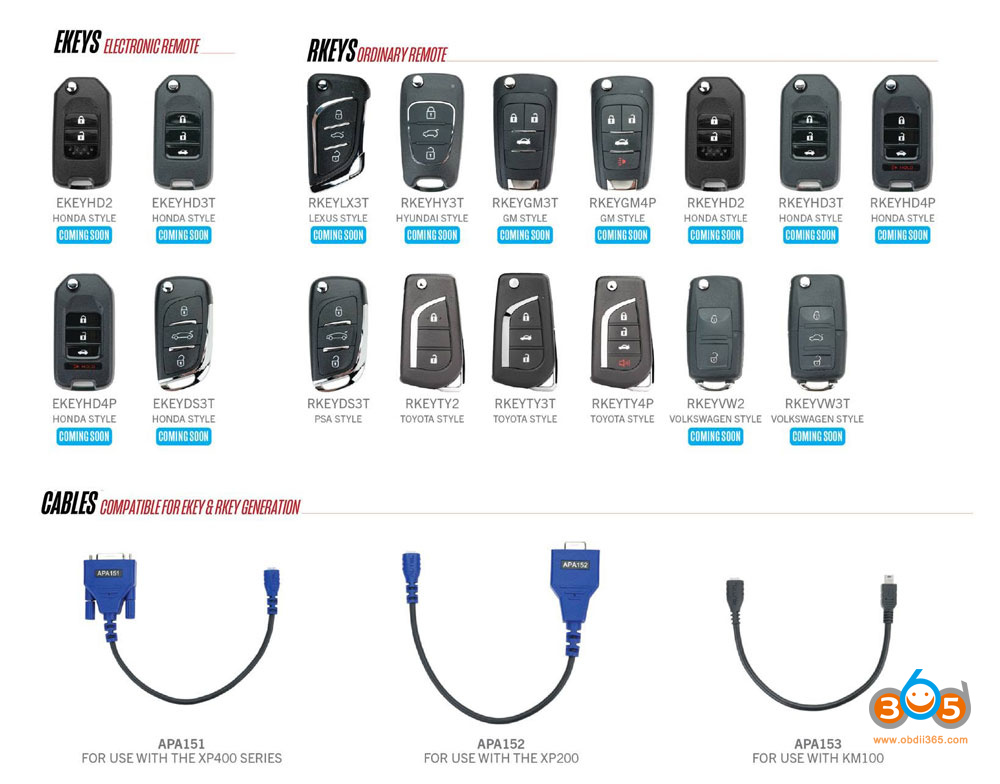
Following theAutel iKEYseries smart keys, AUTEL is set to release the EKEY and RKEY series.
Autel introduces theMaxiIM RKEYandEKEYseries — two universal programmable keys operating across 315MHz and 433MHz frequencies, engineered to replace a cabinet full of blanks with a single programmable solution.
And the best part: both keys are fully supported across the entire Autel MaxiIM product line. The device you already own is all you need.
RKEY delivers remote lock and unlock coverage across multiple vehicle brands. EKEY goes further — a built-in immobilizer transponder that handles advanced security systems with no external chip required.
Less inventory. Broader coverage. One smarter decision.

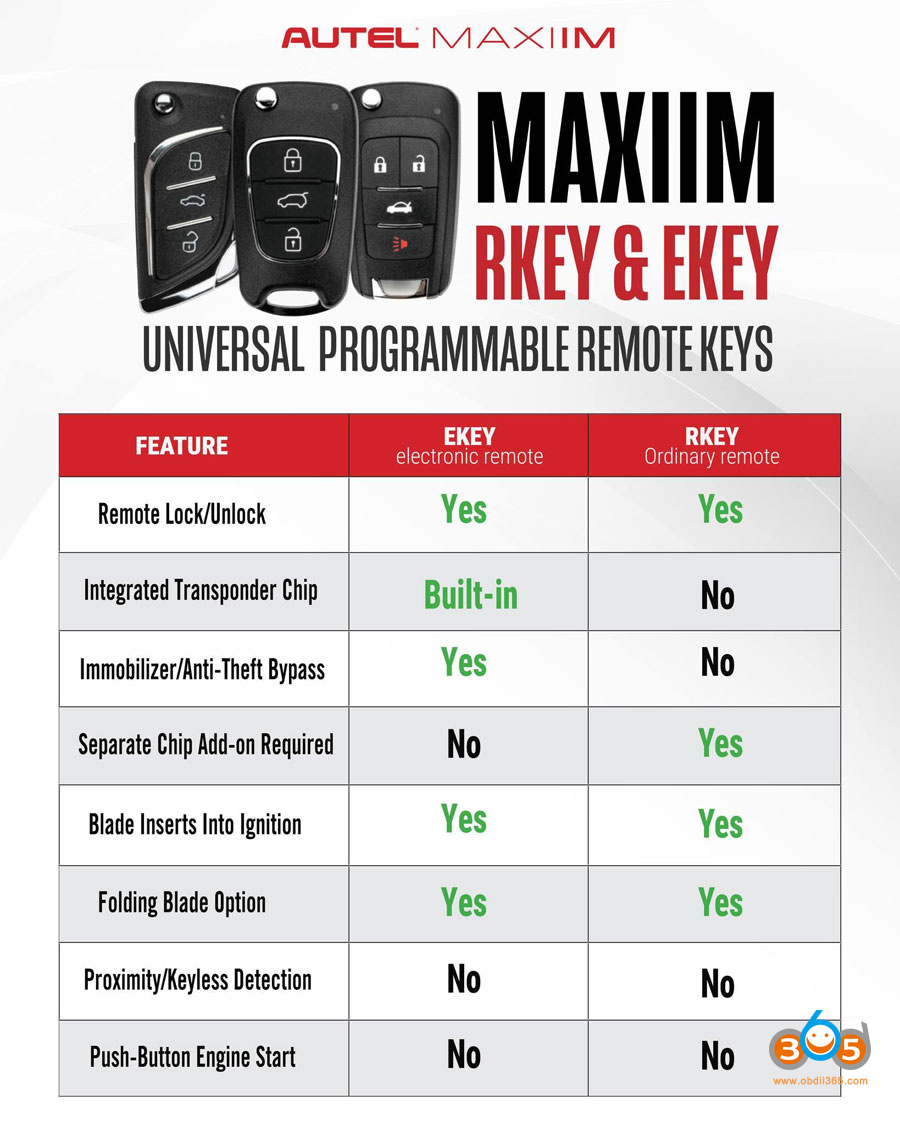
Autel Ekey vs Rkey
| FEATURE | EKEY
electronic remote |
RKEY
Ordinary remote |
|---|---|---|
| Remote Lock/Unlock | Yes | Yes |
| Integrated Transponder Chip | Built-in | No |
| Immobilizer/Anti-Theft Bypass | Yes | No |
| Separate Chip Add-on Required | No | Yes |
| Blade Inserts Into Ignition | Yes | Yes |
| Folding Blade Option | Yes | Yes |
| Proximity/Keyless Detection | No | No |
| Push-Button Engine Start | No | No |

Autel EKEY & EKEY
The RKEY delivers reliable remote lock and unlock across a wide range of vehicle systems.
The EKEY goes further — a built-in immobilizer transponder that works with high-security luxury vehicle protocols. No add-ons. No workarounds.
The all-new MaxiIM EKEY keys are designed specifically for this type of applications. It is equipped with aBuilt-in Immobilizer Transponder, with support for advanced simulation across a range of ID Protocols, including the encrypted systems used in high-security luxury vehicles, and compatible with 315MHz and 433MHz frequencies.
No need for an outside slice.
No need to divert the client away.
Most importantly, EKEY is fully powered via Autel MaxiIM range. That is, the device you use today gives you the ability to provide this level of service directly, without having to change your business system.
The EKEY goes further — a built-in immobilizer transponder that works with high-security luxury vehicle protocols. No add-ons. No workarounds.
FEATURES
Comprehensive vehicle coverage, provide vehicle-specific key configuration for streamlined operation.
Compatible with systems using 315MHz/415MHz.
Supports ultra-long range frequency transmission for reliable, consistent performance.
Built-in immobilizer transponder, support multiple types of immobilizer transponders such as ID11, ID12, ID13, ID47, ID46(PCF7936), ID46(PCF7937), ID46(PCF7946), ID46(PCF7947) (Only support on EKEY series)
Sold Individually, Batteries Not Included.
Emergency Blade Not Included.

Coming soon. Keep an eye on obdii365.com.
Posted by: jean at
08:53 AM
| No Comments
| Add Comment
Post contains 381 words, total size 6 kb.
July 13, 2026
CG FC200Programmer released new software version V1.3.9.0 on July 12th, 2026.
1 Added Platform Mode Erase function for Mercedes-Benz VGS4 TCU (Soldering-free)
Supported Software Versions:
0009020823
0009025731
0009020424
0009021127
0009025831
0009029817
0009021142
0009027331
0009025123
0009022027
0009027426
0009026724
0009022627
0009027626
0009020722
0009022642
0009027926
0009027023
0009024013
0009028347
0009029012
0009024423
0009020118
0009024331
2 Added ECU Types
Dongfeng: LEC4AP
Qoros: M7, ME17.8.8 (TC172
 , ME17.8.8 (TC1767), ME7.8.8
Borgward: MED17 (TC172
, MED17 (TC1767), MED17 (TC1782), MED17.8.10 (TC172
, MED17.8.10 (TC1782), MED17.8.2 (TC1767), MED17.8.21 (TC1767), MED17.8.32 (TC1793), MED17.810.1, MED17.823 Added VIN Modification Support
Volkswagen / Audi: ME7.1.1_800 ST10C167
JMC: EDC17C63
4 Added DTC OFF Support
BYD: TB10
Changan / Jinbei / Foton / Hafei Minyi: TR40, TR4C, STC-213, LEC4A
5 Optimized DTC OFF System Coverage
Dongfeng / JAC / Jinbei / Kama / Wuling: LEC4AP, LEC4AF
BAIC / Dongfeng / Jinbei / Chery / Zotye: ME7.8.8, ME7.9.7.1
BYD / Changan / Qoros / Chery / Geely / GAC: ME17.8.8, MED17.8.X
Changan / Chery / Geely / Haval / GAC / BYD / Luxgen / Lynk & Co / Roewe: M7.8.0, M7.9.71
6 System Optimization
Optimized the MED17.2 type to resolve the issue where the ISN could not be read.

Posted by: jean at
07:11 AM
| No Comments
| Add Comment
Post contains 202 words, total size 3 kb.
July 10, 2026
Remove the driver's side trim panel.


Unclip the retaining clips. Remove the cover panel.


Locate the BCM module.
Unplug the blue connector.


Insert one blue end of the C1032 cable into the vehicle's original blue socket, and plug the other blue end into the original port on the BCM.


The C1032 harness also has two black OBD connectors — plug the male connector into the vehicle's OBD diagnostic port, and connect the female connector to the device's OBD cable.


Once connected, you can start programming the key.
Posted by: jean at
07:55 AM
| No Comments
| Add Comment
Post contains 114 words, total size 3 kb.
July 09, 2026
Read and write Volvo/Renault/UD/Mack truck ECU EMS 2.2 chip MPC5554 byEngineDance X5ecu flasher successfully.
Model example: UD GH11 truck
Read eeprom and flash on bench mode.
Write eeprom and flash on bench mode.
Checksum correction by X5.
DPF and SCR Off ok.


Posted by: jean at
07:27 AM
| No Comments
| Add Comment
Post contains 52 words, total size 4 kb.
July 08, 2026
Magic Motorsport Flexboot glitch unlock new user report:
No cars sitting around in workshops for days on end. Worked flawlessly, hopefully many more to come MG1CS049 - 2024 BMW G82 M4.
Boot glitch unlock.
Then read and write on bench mode.


Posted by: jean at
07:47 AM
| No Comments
| Add Comment
Post contains 48 words, total size 5 kb.
July 07, 2026
Where to download PC software for the newLaunch Prog5(G5) programmer?
The Prog5 can be used standalone or with X431 tablets. When use G5 as a standalone device, it works on PC and doesn't need a PC converter.

Prog5 PC Software Function:
Read, write and clone ECU & TCU via bench and boot mode.
Free download Launch Prog5 PC software
https://en.cnlaunch.com/products-detail/i-251.html#pro_download
Operating system:Win8, Win10
Language:English, German, Russian, Japanese, French, Portuguese, Korean, Italian, Spanish, Arabic
NOTE: The appropriate language-specific installation package must be selected prior to download, as the software does not allow language switching after installation.
Download and install G5 PC software.
The software installation is easy. Install ECU_Clone PC.setup until finished.
Then connect G5 with PC. Check for available software and firmware updates.


The device comes with 1 year free software subscription. Need to renew after software expires.
Launch X-prog5 PC software vs X-prog3 PC software:
Prog5 PC software supports more ECU and TCU cloning types, i.e VAG Simos 18 series cloning, Benz DSM FBS4, VGS4 NAG2/ VGS3 BAG3 FBS4 cloning , more BMW ISN reading types, add ecu checksum correction functions.
Posted by: jean at
07:46 AM
| No Comments
| Add Comment
Post contains 189 words, total size 6 kb.
July 06, 2026
Failed to add key 2025 Dodge Ram Sport 1500 withAutel IM608. The secure gateway with a different connector. The12+8 FCA gateway adapterand the Start connector cannot connect to the gateway connector.

Here is the clue.
New style gateway. No aftermarket device will program the key by OBD. The2025 Dodge Ram 1500 (5th Gen DT, including Sport trim) has a newer style Security Gateway (SGW).
Requires a J2534 passthru device with WiTech.
Nothing aftermarket for new gateway.
Require Witech2.0 with NASTF. The nastf 4 digit pin is for witech.
You are seeing a completely different connector because Stellantis quietly overhauled the electrical architecture for the **2025 RAM 1500 refresh** (the Hurricane engine era).
The classic 12+8 pin Security Gateway (SGW) bypass cable used from 2018–2024 will **not** work on this truck.
Why the Connector is Different?
The 2025 RAM 1500 has upgraded to a new generation cybersecurity firewall utilizing **FD Ethernet (Flexible Data-rate Ethernet)**.
* **The Physical Difference:**
The old SGW relied on traditional CAN-bus pairs (which the 12+8 cable tapped into). The new module manages high-speed ethernet lines, meaning the physical pins, connector size, and wiring layout are totally redesigned.
* **The Software Difference:**
It enforces strict cryptographic authentication that cannot be bypassed by simply throwing a bridge harness between traditional CAN lines.
How to Successfully Program a Key
Because the physical bypass cables you might be used to are incompatible, the workflow for adding a key to a 2025 RAM has shifted toward **authorized software-level unlocking** rather than tearing apart the dash to find a physical bypass plug.
The Authorized Software Route (Recommended)
Instead of trying to find an adapter cable, you bypass the gateway digitally via the OBD-II port:
Hardware:
You will need a high-quality J2534 PassThru interface (like aTopdon R-Link,Autel MaxiFlash, or official Mopar MDP/MicroPod II) paired with a stable internet connection.
Software:
Use official OEM diagnostics via **wiTECH 2.0**.
Authentication:
You must have an active wiTech 2.0 account registered with your diagnostic platform. When you initiate the key programming procedure, the software communicates over the internet to officially unlock the Secure Gateway over the OBD port.
Note:If you are generating a smart key using universal aftermarket remotes (e.g., certain Xhorse or aftermarket platforms), many technicians have reported programming failures on 2025 models. For these newer architectures, it is highly recommended to use an original OEM Mopar proximity fob or a high-quality, pre-coded OE-equivalent key.
Posted by: jean at
07:25 AM
| No Comments
| Add Comment
Post contains 407 words, total size 4 kb.
July 03, 2026
What is the difference betweengolden JLR Pluto VCIand new greenJLR Pluto vci?
Transparent can do 2026.
and has 5 times speed more than gold.
They have the same function.
If need to replace with a new VCI, just install new driver and plug the new VCI. But the old one will stop working.


Posted by: jean at
08:40 AM
| No Comments
| Add Comment
Post contains 65 words, total size 2 kb.
July 02, 2026
Today, we’re looking at a special case: cloning the Volkswagen 5C chip – a process that has recently become more accessible thanks to new functionality in the Autel KM100 programming tool.
This guide walks you through the entire procedure, from reading the original key to generating a cloned chip, while also highlighting some important caveats based on real-world testing.
Understanding the VW 5C Chip
The Volkswagen 5C chip is a transponder used in many modern VW vehicles. Traditionally, duplicating this type of key required disassembling modules, requesting security calculations, or even removing components from the car. However, new techniques now allow technicians to perform a clone based solely on reading the key itself – no need for additional module disassembly or external code requests.
Key advantage: All the necessary information can be extracted directly from the original key, streamlining the duplication process significantly.

Tools Required
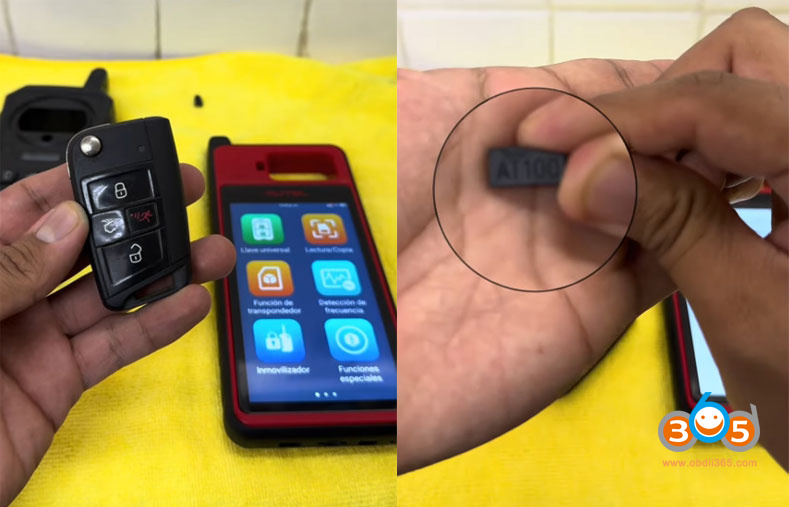
Autel KM100Device – recently updated with a function specifically for cloning 5C keys.
Original VW 5C Key – the one you wish to clone.
Autel AT100 Chip– a blank transponder used to receive the cloned data.
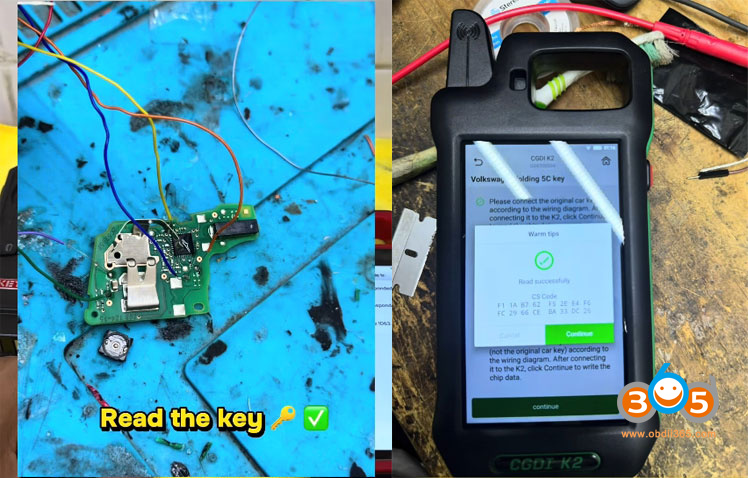
CGDI K2(or similar) programmer – used to read the original key’s CS data (16 bytes required).
Step 1: Read the Original Key
Before you can clone anything, you need to extract the full data from the original key. In this demonstration, a CGDI K2 device is used to connect to the key’s board via wires after opening the key housing. This process reveals the 16 bytes of data – the critical information needed for the clone.
Result: The device successfully reads the key’s identification and security data, including the 16-byte CS code required for duplication.
Check:How to read MQB49 5C key data and CS code with CGDI K2.


Step 2: Generate a Blank 5C Transponder (AT100)
The AT100 chip is a rewritable transponder that will receive the cloned data. Using the KM100 device:
- Navigate to the Transponder Generator function.
- Select ID5C from the menu.
- Choose New ID 5C.
- Press Generate.
- Confirm completion.
At this point, you have a freshly generated blank 5C chip ready to be written with the original key’s data.


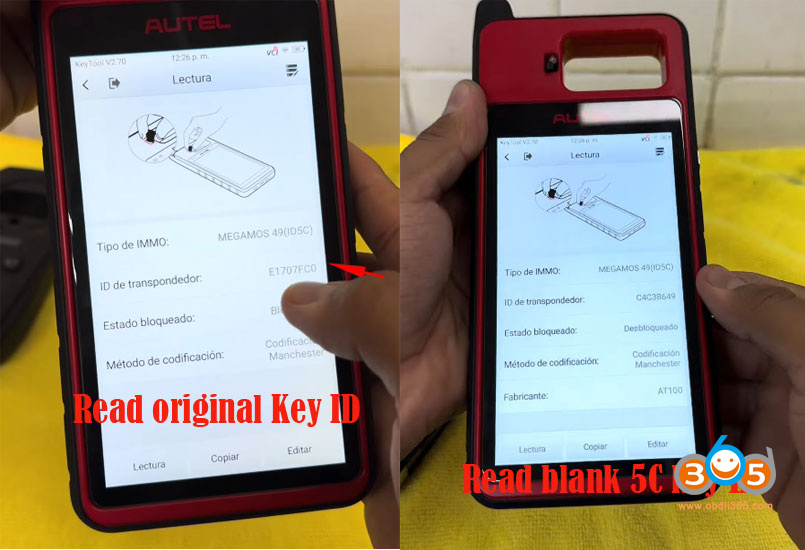
Step 3: Verify Original and Blank Chip IDs
For reference, read both chips:
Original key: Shows ID ending with "C” and displays a closed padlock icon – indicating the chip is locked.
Generated blank chip: Shows a different ID initially and displays an open padlock icon – indicating it is unlocked.
This distinction is crucial, as it reveals one of the main uncertainties about the cloning process.


Step 4: Perform the Cloning Procure
Now comes the core cloning process using the KM100 device:
- Place the original key in the reader slot.
- Press Read to confirm the chip is detected.
- SelectCopyfrom the menu.
- Choose the Volkswagen 5C option.
- Press Accept and then Start.
- Enter the 16 byte cs code security components (obtained from the earlier reading).
- Press Accept – the device will begin reading the key’s information.
- When prompted, remove the original key and insert the AT100 chip into slot T1.
- Press Next and wait for the copy to complete.
- Confirm completion when prompted.


Step 5: Verify the Cloned Chip
After the cloning process, read the newly written AT100 chip:
The ID now matches the original key’s ID.
However, the padlock icon remains open – indicating the chip is still unlocked.
In contrast, when you read the original key again, it shows a closed padlock. This difference raises an important question: does the unlock state affect the clone’s functionality in the vehicle?

The copied AT100 5C key only contains the immobilizer (transponder) data. It can only be used for emergency starting by holding it against the ignition switch. The smart key functions—such as keyless entry and push-button start—require OBD matching through the IMMO menu to be fully enabled.
Posted by: jean at
07:44 AM
| No Comments
| Add Comment
Post contains 640 words, total size 21 kb.
July 01, 2026
What is the difference betweenMucar 892BTand the newMucar 892BT PROdiagnostic scanner? Just same hardware but with topology and more functions?
Here is the clue.
They come with exactly the same case and accessories. But software and license are different.
The 892BT Pro already ships withtopology mapping built in.
The MUCAR 892BT does not support the Topology Map function.
892BT PRO supports more special functions (40+)while 892BT supports 35+ service functions.

Can we migrate Mucar 892 BT to PRO version by software update?
No, the Mucar 892 BT can’t be converted to 892 BT PRO with a simple update.
And here’s why:
Why is updating to Pro not possible?
1. Both versions use different licenses
Although the material is identical, the PRO version includes:
- additional software modules
- licenses for advanced functions
- access totopology mapping
- moremaintenance service functions.
These licenses are paid and related to the device’s serial number.
2. PRO firmware is not compatible with the standard version
Mucar locks firmware to avoid:
- unauthorized facilities,
- software conflicts,
- stability issues.
3. Mucar servers check model before authorizing updates
Even if you manually install an APK, PRO functions do not activate without server validation.
Posted by: jean at
07:41 AM
| No Comments
| Add Comment
Post contains 197 words, total size 3 kb.
32 queries taking 0.0559 seconds, 213 records returned.
Powered by Minx 1.1.6c-pink.