August 11, 2026
Problem:
AnOBDSTAR DC706user was trying to clone a DME for a 2022 BMW X3. It’s an MG1CS201 locked ECU. He was able to unlock ECU withC4-06 adapterin boot mode, then read EEPROM, Flash data and ISN. He was able to write the EEPROM file to the donor unit. The problem is when he tried to write the Flash, it fails to erase sector 4 then quits. Is it possible to clone this module?


Here is the clue.
Not possible to clone/cannot directly clone.
There is OTP sector that you cannot write to.
This is the kind of job you reprogram ECU to car, not clone.
Only sync new DME.
The ISN needs to be transferred by obd2 (need both eeproms from original and donor). Then program afterwards with Esys. Need Windows laptop andEnet cable.Then adapt sync new DME via OBD2.
Posted by: jean at
07:17 AM
| No Comments
| Add Comment
Post contains 149 words, total size 5 kb.
August 10, 2026
OBDSTAR X300 Classic G3successfully added a spare 8A proximity smart key to a 2024 Toyota Tacoma.
Connect a30-pin Toyota cableto bypass the gateway.
Read immo data. This function requires a network connection.
Then add key.
Eoneboss TLK-1collects the data after it is programmed to the car, then transfers the data it collected and write it the unlock smart.
After program key, program ID box with steering lock.
Select immo data backed up, hold a programmed smart key agaigneset the start button to sync ID.
Images attached:


Posted by: jean at
07:20 AM
| No Comments
| Add Comment
Post contains 95 words, total size 12 kb.
August 07, 2026
CG100 Prog IIIreset Toyota 89170-42280 airbag crash successfully.
Part number: 89170-42280
Processor: R5F61725
Read and erase crash on bench mode.


Posted by: jean at
07:14 AM
| No Comments
| Add Comment
Post contains 28 words, total size 6 kb.
August 06, 2026
In this article, we'll cover the most frequently asked questions about this powerful ecu programming tool-OBDSTAR ECU Master.
The tool is divided into four packages: A, B, C, and D. These cover passenger vehicles, motorcycles, heavy-duty systems, and airbag systems respectively. Users can purchase the hardware with full package activation or choose individual package unlocks based on their specific needs.
Supported Vehicle Models
The ECU Master supports a broad range of manufacturers and modules. In the software, users can view a comprehensive list of compatible vehicles and systems. One notable feature is the color coding:
Red text indicates modules that are in beta version or have been recently added in the latest update.

Heavy-Duty Vehicle Support
A major differentiator for the ECU Master is its heavy-duty line support – a feature not available in other OBDSTAR tools like the DC706. The tool supports:
BCM, ECM, and TCM systems for trucks
Power/torque modification options
Solenoid writing
Actuator hours modification
Engine number changes
Power Supply Requirements
For heavy-duty vehicle programming, the tool requires an external power supply capable of delivering:
21–24V
At least 5A
This is critical to maintain stable voltage during programming – especially for truck modules.
Advanced Functions
While the ECU Master currently does not have a dedicated "Advanced Functions" menu like the G3, many advanced operations are already available within the specific module menus.
Common Questions and Answers
1. Will the DC706 Stop Working After the ECU Master Release?
No. The DC706 will continue to function normally. The ECU Master is a new tool with added capabilities (especially heavy-duty support), but it does not replace or disable existing tools. In fact, many of the functions available on the ECU Master are the same as those on the DC706.
2. Are MP001, P003, or P004 Adapters Needed?
No. Because the ECU Master is a new release, these adapters have already been integrated into the hardware. Users do not need to purchase separate adapters – all necessary connections are built in.
3. What About Fiat Systems?
Fiat has many systems currently under development. While some functions may not work 100% yet, the engineering team is actively working on implementation. Users may notice that some Fiat modules do not show a dedicated "Erase Crash" option. However, in many cases, performing a DTC erase will also clear crash data – especially on newer Fiat modules.
4. Why Do Some Modules Show Different Colored Connectors?
This is not unique to OBDSTAR tools – it's an industry-wide reality. The same module can come in multiple versions with different connector colors (e.g., white, gray, green, pink, yellow). If the tool doesn't show your specific connector version, you have two options:
Search for the pinout online using the module number
Contact OBDSTAR support for assistance
5. What If the Tool Won't Communicate with a Module?
If communication fails even after following the correct connection procedure:
Collect the log data from the tool
Send the logs along with the tool's serial number to the support team
Ensure your tool is within the update period so that test or repair files can be downloaded
The factory will analyze the logs and may send a test file. Turnaround time can vary (24–48 hours) depending on time zones and the complexity of the issue.
6. What Are Beta Versions?
Beta versions are test modules that are still under development. If a module is marked as beta and you encounter issues, simply send the log data to support. The engineering team will gradually improve and add functionality over time.
Bench vs. Boot Connections Explained
One common source of confusion is the difference betweenbench (BENCH)andboot (BOOT)connections:
| Connection Type | Description |
|---|---|
| Bench (BENCH) | Uses a dedicated connector or pinout. No soldering required. The tool provides step-by-step pinout diagrams. |
| Boot (BOOT) | Requires soldering to specific points on the PCB to unlock communication. The tool provides detailed diagrams showing which pins or capacitors need to be bridged or removed. |

Log Collection and Factory Support
When encountering issues, users are encouraged to:
-
Perform the connection as per the tool's instructions
-
If communication fails,collect log datafrom the tool
-
Send logs + serial number toOBDSTAR support
-
The factory will analyze and potentially send a test file
-
Wait for feedback (typically 24–48 hours)
This feedback loop iscritical for the tool's ongoing development, especially for beta modules.
Posted by: jean at
07:40 AM
| No Comments
| Add Comment
Post contains 719 words, total size 8 kb.
August 05, 2026
What is the difference between Thinkcar Thinkscar 689BT Pro, 689BT and Mucar 892BT lifetime-free-update diagnostic scanners?
Check the table comparison below:
| Feature | Thinkcar 689BT Pro | Mucar 892BT | Thinkcar 689BT |
|---|---|---|---|
| Screen Size | 8 inch | 8 inch | 8 inch |
| Memory | 4+64GB | 4+64GB | 4+64GB |
| Battery Capacity | 4150mAh | 4150mAh | 4150mAh |
| Protocols | ISO14230-4 (KWP2000) ISO15765-4 (CAN) ISO19141-2 (iso) ISO14229 (uds) SAEJ1850 (VPW & PWM) CAN-FD: DOIP J2534 |
ISO14230-4 (KWP2000) ISO15765-4 (CAN) ISO19141-2 (iso) ISO14229 (uds) SAEJ1850 (VPW & PWM) CAN-FD: DOIP |
ISO14230-4 (KWP2000) ISO15765-4 (CAN) ISO19141-2 (iso) ISO14229 (uds) SAEJ1850 (VPW & PWM) CAN-FD: DOIP |
| AI Assistance | x | Yes | X |
| VAG Guided | Yes | Yes | Yes |
| Topology Mapping | Yes | x | x |
| Active Test | Yes | Yes | Yes |
| ECU Coding | Yes | Yes | Yes |
| Reset Function Count | 35 | 35 | 34 |
| Full System Diagnostics | Yes | Yes | Yes |
| Lifetime Free Fees | Yes (Excluding FCA) | Yes (Excluding FCA) | Yes (Excluding FCA) |
| Languages | Supports 28 languages | Supports 28 languages | Supports 28 languages |

In sum:
689BT Pro is the most advanced model, adding Topology Mapping, J2534 protocol— features not available on the other two.
892BT and 689BT are nearly identical in hardware and basic functions, except the 689BT has 34 reset functions while the 892BT and 689BT Pro both have 35. Mucar supports AI feature, 689BT series does not.
All three share the same screen size, memory, battery, language options, and lifetime free update policy (excluding FCA).
Posted by: jean at
08:43 AM
| No Comments
| Add Comment
Post contains 233 words, total size 4 kb.
August 04, 2026
Problem:
Tried to unlock the Hyundai smart key usingEoneBoss HK002(orHK001) key tool, the App kept scanning and no response. Any solution?


Cause:Location services are not enabled on the phone.
Solution:
Turn on location services on your mobile phone and try again.
It will work without problem.
To turn on location services, open your phone’s Settings app, go to your location or privacy menu, and turn the master switch to the on position.
Posted by: jean at
07:37 AM
| No Comments
| Add Comment
Post contains 79 words, total size 3 kb.
August 03, 2026
Problem:
It’s a 2025 Dodge Ram ProMaster. All keys have lost.Autel IM508with12+8 cablewas able to pull pin code, but it will not erase keys or allow new one to be programmed.
Will it even pull the pin code if RF Hub is locked? Can we do this with Witech if RF Hub is locked?

Here is the clue.
Rfhm locked means the it has the rf hub lockout update. No keys can be added.
RFH locked means the hub is locked to vehicle and that’s always the case. Because it can only be used once and it locks to that car no way to unlock.
It says rfhm locked that means it’s locked to due to update. Rfh locked is the hub being locked to vehicle.
All promasters 25 and up are locked.
Solution:
Need to replace rfh an then use witech to program both.
Rfh is located in headliners.
Install a new hub and keys programmed without any issues.
Even with witech you have to replace RFH to new one.
The RFH new from the dealer was 160$.
Easy to program with witech them you program new keys.
Posted by: jean at
07:42 AM
| No Comments
| Add Comment
Post contains 198 words, total size 2 kb.
July 31, 2026
MG1CS042 successfully done !
It's a Citroen C5 Aircross with Bosch MG1CS042 encrypted ECU.
Boot glitched unlocked withMagic Motorsport Flexprogrammer.
Then read and write on bench mode.


Posted by: jean at
07:39 AM
| No Comments
| Add Comment
Post contains 34 words, total size 3 kb.
July 30, 2026
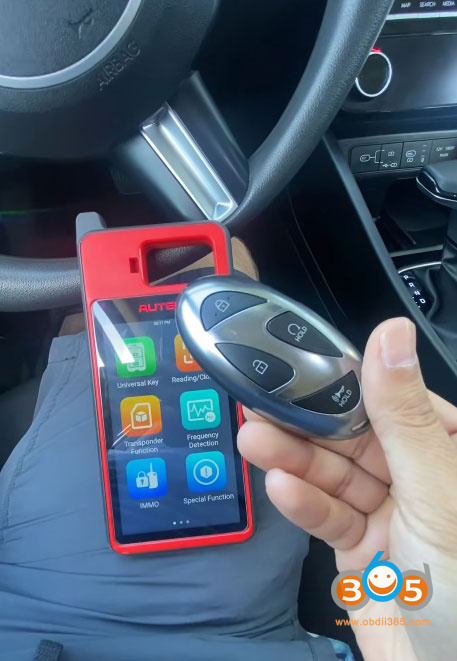
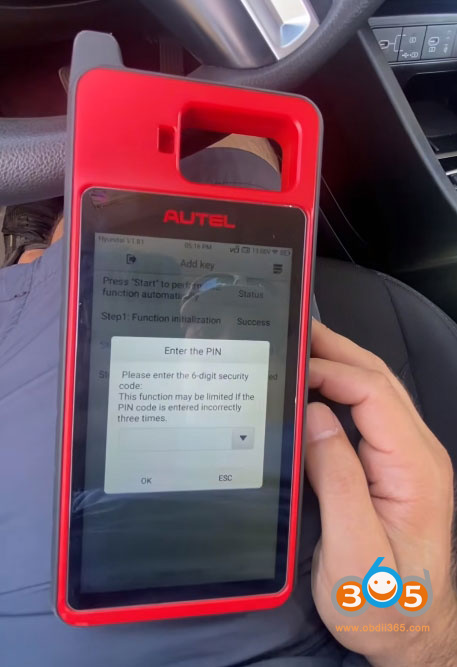
How to program a spare smart key for a 2025 Hyundai Tucson using the Autel MaxiIM KM100, a popular and capable key programming tool. The job wasn’t entirely straightforward, but with a few workarounds and some persistence, we got the job done successfully.
Vehicle and Tools
-
Vehicle:2025 Hyundai Tucson (Smart Key system)
-
Tool Used:Autel KM100
-
Goal
 rogram a spare working smart key while retaining the customer’s original key

Initial Setup and Vehicle Identification
We started by connecting the Autel KM100 to the vehicle’s OBD-II port. The tool prompts you to read the vehicle’s VIN automatically, which is usually the quickest way to identify the correct system. However, in this case, the auto VIN function did not work as expected, and the model was not immediately recognized by the tool.
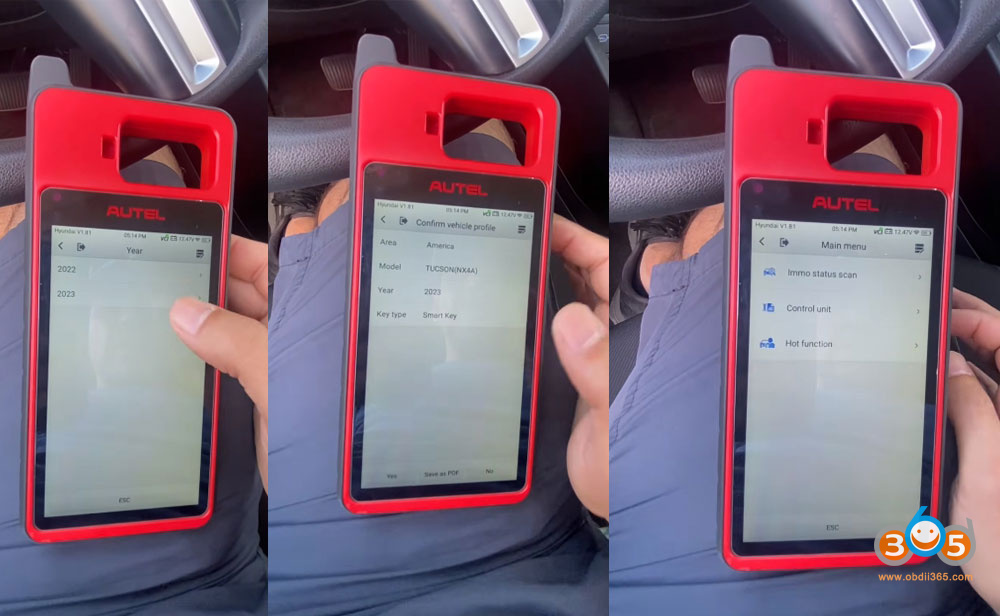
I attempted to let the system pull the VIN, but when that failed, I moved to the manual selection process:
Selected the region: America
Chose the vehicle model: Tucson
Selected the model year range. Since the tool didn’t have a specific entry for 2025, I chose 2021 and newer, which failed to communicate with vehicle.

Later tried 2022–2023 options, assuming the system would be compatible. This option did IMMO scan successfully.
This is a common workaround when dealing with very new models—the underlying immobilizer system often remains the same across several model years.

Reading the Immobilizer Status
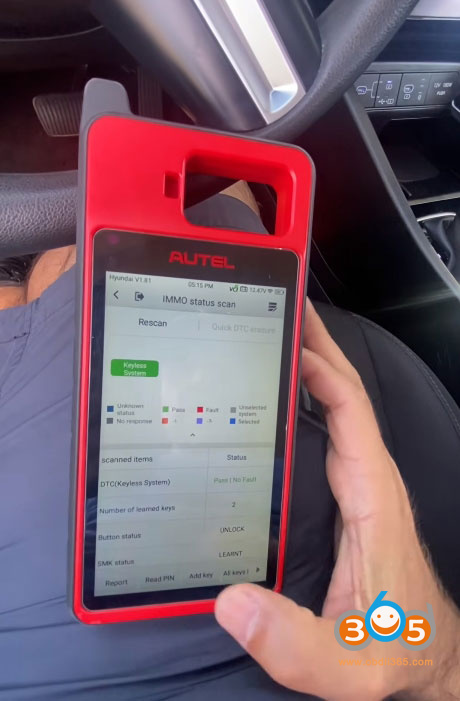
Once the vehicle was manually selected, I performed an IMMO status scan. This gave us useful information:
The system showed that two keys were currently programmed to the vehicle.
Communication with the immobilizer system was established, confirming that the tool could interact with the vehicle’s security module.
At this point, everything looked healthy, and we were ready to proceed with key programming.


The PIN Code Challenge
In order to add or replace keys on most Hyundai vehicles, you need the vehicle’s immobilizer PIN code. This is a security measure to prevent unauthorized key programming.
I attempted to read the PIN code directly via OBD using the KM100’s built-in function. Unfortunately, the tool could not retrieve the PIN automatically for this 2025 model. This is not uncommon, especially with newer vehicles where security protocols are updated frequently.
My solution: I obtained the PIN code from an external source—a subscription-based key data service that provides PIN codes for various makes and models. Once I had the PIN, I manually entered it into theAutel KM100, and the tool accepted it without issue.


The Programming Process
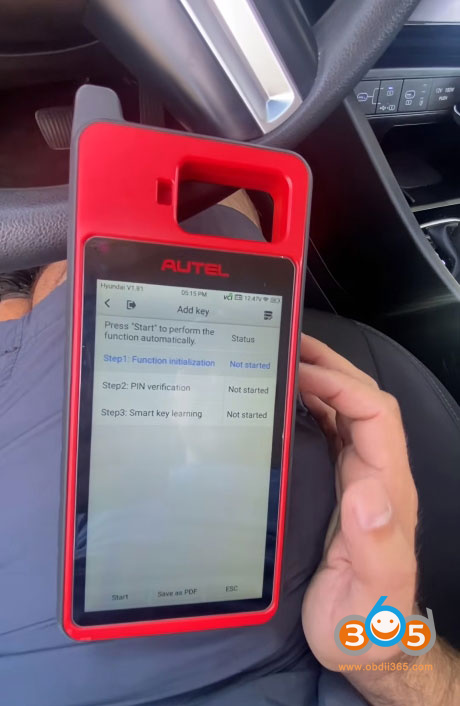
With the PIN code in hand, I started the actual programming procedure:
Initiated the key programming function on the KM100.
The tool warned that all existing keys would be erased and that we would need to relearn both the old and new keys. This is standard for Hyundai smart key systems—it’s an "all keys lost” type of procedure, even when adding a spare.
Ignition OFF was confirmed, and the tool communicated with the vehicle’s immobilizer module.
Entered the PIN code manually when prompted.
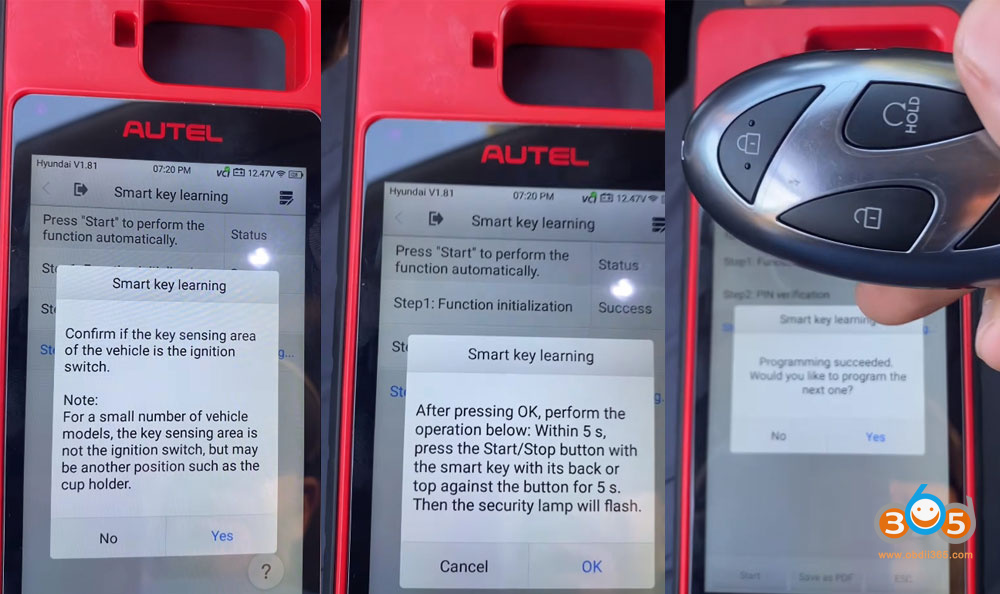
The tool then guided me through the key learning process. For this Hyundai, the procedure required:
Placing the smart key against the start button (the key sensing area).
Pressing the start button with the back of the key within 5 seconds of the on-screen prompt.

Programming Both Keys
I started with the new spare key. The tool confirmed: "Programming succeeded.”
I then selected "Yes” when prompted to program the next key.
I repeated the same physical procedure using the customer’s original key.
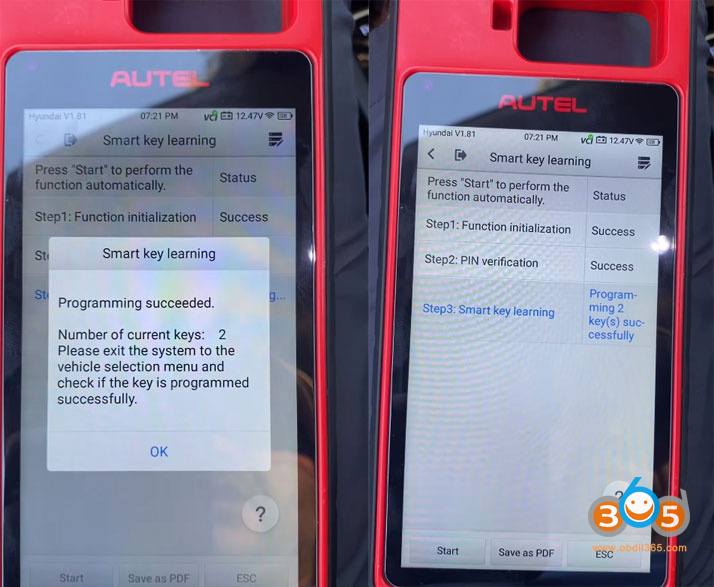
Again, the tool confirmed success.
After both keys were programmed, the system showed that two keys were now active.

Final Verification
I exited the programming menu and tested both keys:
The customer’s original key worked perfectly—remote locking/unlocking and engine start functioned as expected.
The new spare key also worked perfectly, with full remote and start functionality.
The job was complete.
Challenges and Takeaways
Auto VIN and Model Selection Issues:The Autel KM100 did not immediately recognize the 2025 Tucson. Manually selecting a similar model year (2022–2023) worked fine, as the immobilizer system was compatible.
PIN Code Retrieval:The tool could not pull the PIN code via OBD for this vehicle. Having access to an external PIN code source was essential. This is something to keep in mind if you’re working with very new Hyundai or Kia models.
All Keys Erased:The process erases all existing keys, so you must have both the original and any new keys on hand to relearn them.
Physical Key Placement:Following the on-screen instructions precisely—especially the 5-second window for placing the key against the start button—is critical for success.
Posted by: jean at
07:26 AM
| No Comments
| Add Comment
Post contains 761 words, total size 14 kb.
July 29, 2026
Problem:
A customer programmed a new key on a BMW F10 CAS4+ usingYanhua Mini ACDP2via OBD. After programming, the remote functions and Comfort Access work perfectly on the new key. However, the car won’t start.
Solution:
Perform a fix start function
Sync CAS to DME and will start again.
Look for "Sync code lost repair” function and if it doesn’t work, for "reset starter motor”.


Posted by: jean at
06:48 AM
| No Comments
| Add Comment
Post contains 76 words, total size 2 kb.
30 queries taking 0.2348 seconds, 213 records returned.
Powered by Minx 1.1.6c-pink.