June 25, 2026
In the rapidly evolving world of automotive diagnostics, choosing the right scan tool can be overwhelming. Two prominent contenders in the mid-level market are the MUCAR 892BT and the Thinkcar Thinkscan 689BT. While they share many similarities—including being manufactured by the same parent company—there's one significant difference that sets them apart: artificial intelligence.

The Key Difference: AI Integration
The MUCAR 892BT distinguishes itself by incorporating AI functionality, specifically the "MU AI" intelligent assistance feature. This isn't just a gimmick; it provides practical, time-saving benefits during real-world diagnostic work.
The Thinkcar 689BT, while an excellent tool in its own right, lacks this AI capability. Given that both tools are similarly priced—with the MUCAR 892BT currently available at a lower cost—the choice becomes clear for most users.
Real-World Performance
What They Share
Both tools offer:
-
Similar physical design with identical button layouts and screen patterns
-
Compatibility with the same vehicles and diagnostic functions
-
Bidirectional controls for testing components
-
Support for add-on accessories like key programmers and oscilloscopes (with future expansion)
-
Free lifetime updates (as long as the company supports the product)
The MUCAR Advantage
The 892BT's AI feature provides several practical benefits:
1. Intelligent Code Interpretation
When you pull a diagnostic trouble code (DTC), the MU AI offers detailed explanations, often including:
-
How the component works
-
Step-by-step troubleshooting walkthroughs
-
Failure level assessments
-
Component location images
-
Wiring diagrams
2. All-in-One Information Hub
Instead of bouncing between your laptop, phone, and the vehicle, the MUCAR allows you to:
-
Access Google searches directly
-
View AI-generated diagnostic guidance
-
See wiring diagrams and component locations
-
Watch YouTube repair videos on the tool itself
3. Time Savings
By consolidating multiple information sources into one device, the MUCAR eliminates the need to constantly move between the vehicle and your computer. This efficiency translates directly to time—and money—saved.
Performance on Different Vehicles
The MUCAR 892BT demonstrates versatility across various makes and models:
Honda Odyssey (2016)
-
Completed a full scan in approximately 90 seconds
-
Identified 4 DTCs across 10 modules
-
Noted low battery voltage issues in the ABS module
GMC Duramax Diesel (2011)
-
Scanned 18 computers and found 40 DTCs
-
Identified fuel level sensor issues
-
Provided diesel-specific functions including DPF regeneration
-
Offered detailed wiring diagrams and sensor location images
RAM 2500 Cummins Diesel (2015)
-
Scanned 19 systems quickly
-
Provided comprehensive diesel functions including:
-
Stationary DPF regeneration (requires up to 80 minutes)
-
Gearbox relearn
-
Turbo actuator calibration
-
Transport mode settings
-
Mazda CX-30 (2021)
-
Scanned 22 modules in under 5 seconds
-
Minor quirk: required manual navigation to Mazda menu before auto-reading VIN
Buick Encore (2022)
-
Included helpful guidance for push-start vehicles (long press start button for 5-10 seconds)
-
Identified antenna signal circuit issues
What You'll Love
Free Lifetime Updates
Unlike many competitors that charge expensive annual subscriptions, the MUCAR offers free software updates for life. This alone can pay for the tool over time.
Magnetic Dongle
The OBD-II connector uses a strong magnet that securely stays in place—a welcome improvement over competitors whose dongles frequently fall out.
Fast Boot Times
The MUCAR powers up quickly, saving precious seconds during each use.
Portable Design
The compact, lightweight tablet can fit in a back pocket, making it convenient for shop or mobile use.
Report Generation
Full diagnostic reports can include AI troubleshooting information, useful for documentation or customer communication.
Limitations to Consider
No tool is perfect, and the MUCAR 892BT has its shortcomings:
Missing Topology View
Unlike some higher-end tools, the MUCAR doesn't display network topology—a visual representation showing which modules communicate with each other. This feature can be invaluable for diagnosing complex communication network issues.
No Built-in Flashlight
A small but practical omission. A light would help when locating the OBD port under dark dashboards.
No Camera for VIN Scanning
Manual VIN entry is still required on some vehicles, though the tool often auto-reads it once you navigate to the correct manufacturer menu.
Limited Module Programming
While the MUCAR supports some programmable module installation, it lacks comprehensive reprogramming capabilities for replacing modules with new ones that need VIN coding. This is common among mid-level tools but worth noting.
AI Not Always Perfect
The AI isn't infallible. In some cases, a simple Google search provided better information than the MU AI. It's still worth checking both sources when troubleshooting.
Final Verdict: Which Should You Buy?
The MUCAR 892BT wins for most users.
Here's why:
-
It has AI featuresthat genuinely assist with diagnostics, providing wiring diagrams, component locations, and troubleshooting guides on the fly.
-
It's currently cheaperthan the Thinkcar 689BT, despite offering additional functionality.
-
Lifetime free updatesmean you won't face expensive annual subscriptions just to keep your tool current.
-
Same core functionalityas the Thinkcar in terms of vehicle coverage, bidirectional controls, and diagnostic capabilities.
-
Future-proofing—even if AI is in its early stages, updates will only improve its capabilities over time.
Who Should Buy It?
-
DIY enthusiastswho want professional-level diagnostics
-
Shop mechanicsseeking a capable secondary or primary mid-range tool
-
Mobile technicianswho value portability and all-in-one functionality
-
Diesel ownerswho need DPF regeneration and other specific functions
-
Anyone tired of subscription feesfor diagnostic software
Who Should Look Elsewhere?
-
Professional shopsrequiring advanced module programming capabilities
-
Technicianswho need topology views for complex network diagnostics
-
Userswho prioritize camera-based VIN scanning
The Bottom Line
TheMUCAR 892BTrepresents excellent value in the mid-level scan tool market. While it has room for improvement—and the AI is still evolving—it offers a compelling package of features, free updates, and practical functionality that makes it a worthy replacement for older tools, including its close cousin the Thinkcar 689BT.
As one mechanic puts it:"The more I can sit there in the driver's seat in the air conditioning of the car and diagnose that car, the better."
If you're looking for a capable, future-ready scan tool without the burden of ongoing subscription costs, the MUCAR 892BT deserves serious consideration.
Posted by: jean at
07:11 AM
| No Comments
| Add Comment
Post contains 966 words, total size 11 kb.
June 24, 2026
In the crowded world of OBD2 scanners, theMUCAR 892BTstands out by offering a compelling package:built-in AI assistance,lifetime free software updates, and a responsive, user-friendly interface. But does it deliver on its promises? After extensive real-world testing on vehicles ranging from a 2000 diesel truck to a modern daily driver, here is the full verdict.
First Impressions & Unboxing
The MUCAR 892BT arrives as a complete kit designed for professional and serious DIY use. Inside the well-organized carrying case, you will find:
-
The 8-inch tablet scanner
-
A wireless Bluetooth VCI (Vehicle Communication Interface) with a strong magnetic back
-
Cables and adapters including: Ethernet for DoIP, USB-A to Ethernet adapter, and a USB-A to C charging cable
-
Multiple plug types for different regions
-
A screen protector and a wall charging brick
The tablet itself feels premium, with a bright, crisp screen and a handy built-in kickstand that easily props up on a steering wheel. Thewireless Bluetooth VCIis a standout feature, allowing you to move freely around the vehicle without being tethered by a cable.


Key Features That Set It Apart
1. Lifetime Free Updates – A Game Changer
One of the biggest selling points is thelifetime free updates. Unlike many high-end competitors that charge hundreds of dollars annually, the MUCAR 892BT lets you download the latest vehicle software at no extra cost.
Important Clarification:If the manufacturer ever stops providing updates, the tool does not become a brick. It will continue to work on all vehicles it already supports. You simply won't be able to diagnose newer models that come out after the update cutoff. This is standard for all scan tools.
2. Built-in AI Assistant
The AI assistant is more than a gimmick. It can answer both car-related and general questions. For example:
-
Ask about a specific trouble code (e.g., P0420) and it provides probable causes and fixes.
-
Ask general questions like "How hot is the sun?" and it pulls up factual information.
This feature is integrated into the diagnostic workflow, making it easy to get quick insights without reaching for a phone or laptop.
3. Dollar Fix Community
The tool includes access to theDollar Fix community—a public forum where users can post questions about their vehicles and get advice from other DIYers and mechanics. This crowdsourced knowledge base can be invaluable for troubleshooting tricky problems.
4. Full Bi-Directional Control & OE-Level Diagnostics
The MUCAR 892BT supportsfull system scanningandbi-directional control, meaning it can both read data and send commands to vehicle actuators. During testing, the reviewer successfully:
-
Activated the blower motor and wipers on a modern GM truck
-
Ran a relative compression test on a 2003 Ford 6.0 diesel
-
Performed cylinder contribution tests on a 7.3 diesel
It coversover 140 car brandsand supports advanced functions likeECU coding,34+ maintenance services(oil reset, ABS bleeding, DPF regen, etc.), and protocols likeDoIPandCAN FD.
Real-World Testing: Diesel Trucks vs. Modern Vehicles
On Older Diesels (2000 F250 7.3L & 2003 F350 6.0L)
-
Auto VIN detection often failson these older trucks (likely due to aftermarket tuners).
-
Manual vehicle selectionworks well.
-
The tool provided comprehensive live data streams (fuel trims, cylinder contributions, etc.).
-
It successfully performed arelative compression teston the 6.0L, identifying a weak cylinder without needing special adapters.
-
Limitations:It did not support advanced injector buzz tests or some specific Powerstroke functions. The reviewer notes that for these older diesels, specialized software likeForScanis still superior.
On a Modern Daily Driver (Newer GM Truck)
-
Auto VIN detection worked flawlessly.
-
The tool identified a massive number of modules (video processing, body control, powertrain, etc.).
-
Bi-directional testswere extensive and worked perfectly—controlling HVAC, wipers, washer pumps, and more.
-
The tool shines brightest on modern vehicles with complex electronic architectures.
The reviewer repeatedly praises thefast and responsiveinterface. The Android-based tablet navigates menus smoothly, and the screen recording feature (built into the tool) makes it easy to capture diagnostics for later review.
Standout Features:
-
Screen Recorder & Screenshots:Useful for documenting issues or sharing with customers.
-
Third-Party Apps:You can install apps like YouTube, Google Chrome, and even games (Candy Crush) directly on the tablet, turning it into a versatile shop companion.
-
Customer Management:Shop owners can store customer info and generate professional health reports with their business logo.
Pros & Cons at a Glance
Pros:
Lifetime free updates
Built-in AI and community forum
Fast, responsive interface
Wireless Bluetooth VCI with magnetic mount
Extensive bi-directional control on modern cars
Supports third-party apps like YouTube
Generous 34+ service functions
Cons:
Some advanced tests (e.g., injector buzz on older diesels) not supported
Auto VIN detection may fail on heavily modified older vehicles
Requires internet connection for some AI and community features
Final Verdict: Is It Worth It?
TheMUCAR 892 BTishands-down the reviewer's favorite scan tool—even over more expensive units. It offers an unbeatable combination of features, speed, and long-term value thanks to the lifetime updates.
Who Is This For?
-
Serious DIYers and enthusiastswho want professional-grade diagnostics without recurring fees.
-
Independent shops and mobile mechanicslooking for a cost-effective, capable tool for modern vehicles.
-
Owners of newer vehicleswho will benefit most from the bi-directional controls and deep module access.
Bottom Line:For under $500, the MUCAR 892BT delivers exceptional value. It's fast, feature-rich, and future-proofed by free updates. If you're in the market for a scan tool that does almost everything without breaking the bank or locking you into expensive subscriptions, this is a top contender.
Posted by: jean at
07:52 AM
| No Comments
| Add Comment
Post contains 893 words, total size 10 kb.
June 23, 2026
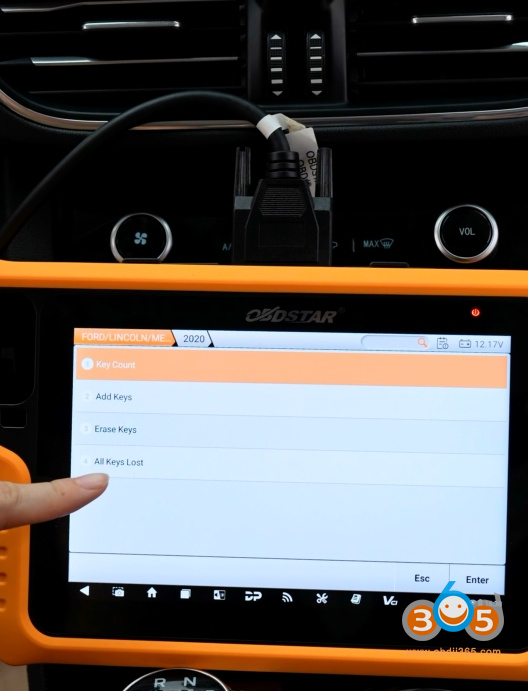
Tutorial: How-to program Ford Escape 2020 all smart keys lost withOBDSTAR X300 Classic G3by OBD.
No bypass cable or 3rd party pin code required.
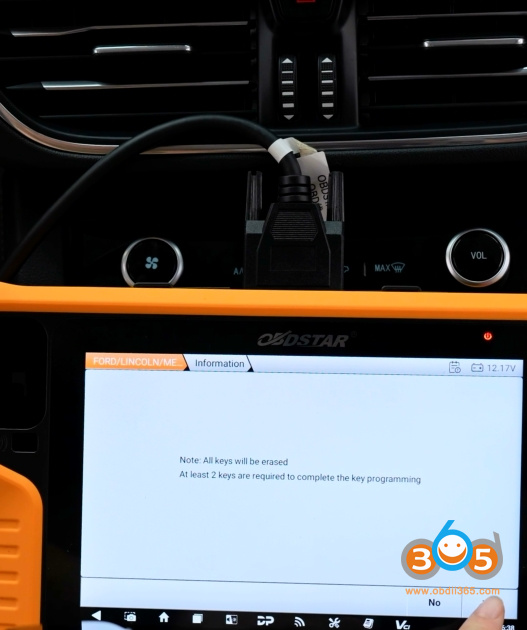
Requires at least 2 keys to be programmed.
Select Ford- Select by module-Asia- Escape- Proximity- 2020


Read key number.
3 keys existed.


Select All Keys Lost
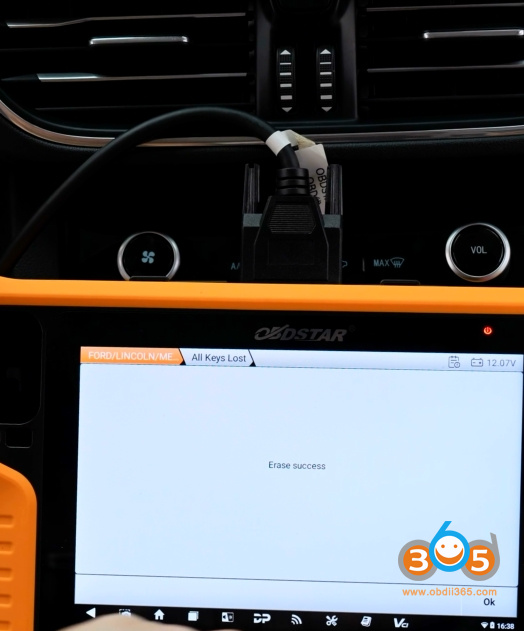
All keys will be erased.


G3 will ask to switch ignition off, which we don’t actually do.
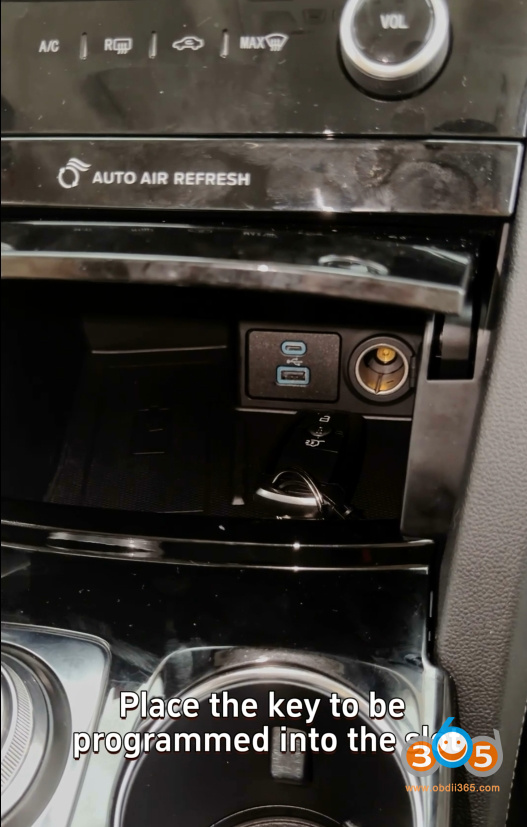
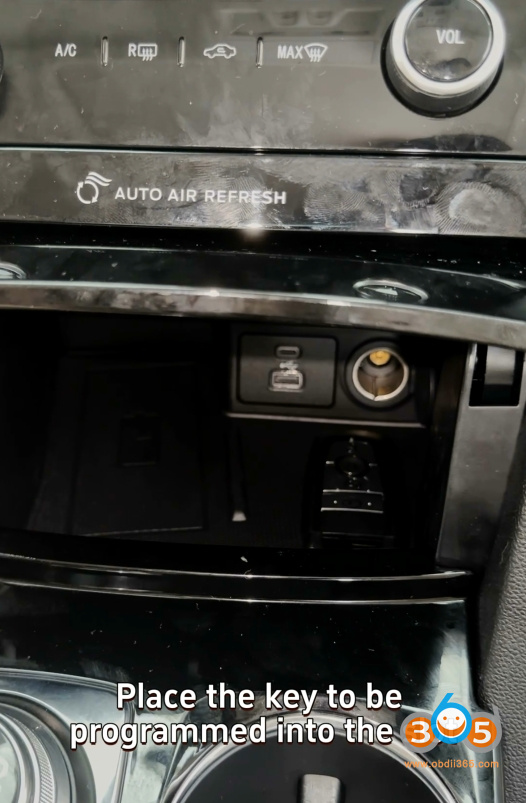
Place the 1st key to be programmed into the slot.
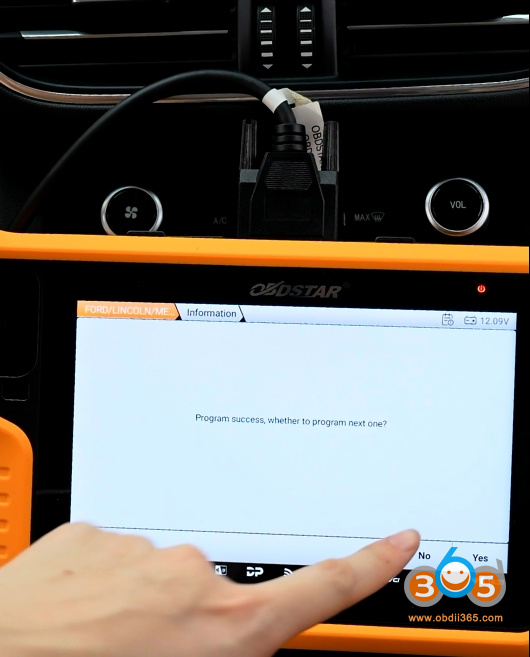
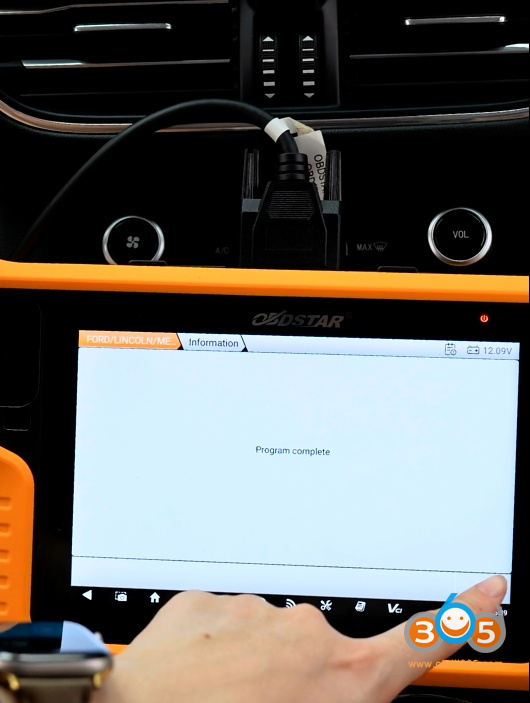
Program 1st key successfully.


Place 2nd key to be programmed into key slot.
Program 2nd key successfully.


Posted by: jean at
07:48 AM
| No Comments
| Add Comment
Post contains 104 words, total size 12 kb.
June 22, 2026
Problem:
Got the2M2 Tank 2 Pro key cutting machinewith a built-in battery. Everything worked normally until yesterday, when the machine suddenly shut down while not connected to a power source. The machine failed to charge the battery.
Troubleshooting Steps:
Step 1:
Remove the four screws on the bottom cover and measure the voltage across theyellow wireandblack wire.If the reading isgreater than 22V, proceed to Step 2.


Step 2:
Measure the voltage across thered wireandblack wire.If the reading isbelow 20V, proceed to Step 3.


Step 3:
Using a power adapter, directly charge the device for approximately 1 hour according to the images below. Afterward, re-measure the voltage across thered and black wires(as in Step 2) to check if the reading is higher than before.


Once you have completed the tests, please send the results to 2M2 Tank engineers. They will analyze the findings and advise whether a battery replacement is needed.
Posted by: jean at
07:03 AM
| No Comments
| Add Comment
Post contains 161 words, total size 3 kb.
June 18, 2026
Keydiy KD-X4 new user feedback:
"Today I successfully programmed an MQB49 key with a 5D chip for a 2022 Audi e-tron. I used theKEYDIY KD-X4for the job.
The first task was to safely disassemble the key. It wasn’t difficult at all—in fact, I would say it was quite easy. Then, using an adapter, I read the key information, created a dealer key, changed the key ID to match the ID of the original lost key, and then programmed it to the vehicle. The vehicledid not have SFD.
The key I used was an original used key. The programming process went smoothly and without any issues.
I have a feeling that KEYDIY is one step ahead in this area.
The key I used had three chips, compared to the original key, which had only two chips. I assume that the key I used was from a vehicle with more advanced comfort features.
Despite this difference, everything works perfectly and there are no error messages or fault codes.”


Posted by: jean at
07:48 AM
| No Comments
| Add Comment
Post contains 175 words, total size 4 kb.
June 17, 2026
Problem:
Tried to read SsangYong Delphi DCM3.7AP ECU withEngineDance X5 ecu programmer via OBD mode. But it ask for the password based on the dynamic code. Where to get the password?

Solution:
Get the password from EngineDance X5 engineer by providing 1) ECU and EngineDance X5 device 2). Software operation interface.
Posted by: jean at
09:15 AM
| No Comments
| Add Comment
Post contains 57 words, total size 1 kb.
June 16, 2026
Successfully added a spare blade key to a Dacia Docker 2014 withOBDStar X300 Classic G3programmer via OBD.


Posted by: jean at
08:00 AM
| No Comments
| Add Comment
Post contains 75 words, total size 6 kb.
June 15, 2026
Problem:
Working on a 2025 Toyota GR86 withLonsdor K518 Pro. Need to add a key, Does anyone know of this the same as the other Toyota rolling code procedure? Will the 3rd party calculate this for me?

Solution:
2 Ways to get pin code:
1.) Provide rolling code to 3rd party to get pin code.
2). Provide the rolling code to Lonsdor engineer to calculate pin code.
Supports 2021- GT86 add key by OBD.
Supports Lonsdor LT20 smart key.
Menu path: Toyota/Select from vehicle/Asia/GT86/2021-/PEPS (CAN)

How to get the pin code from Lonsdor?
It is recommended to provide an on-site video when providing code calculation services, in order to verify whether it is truly a total key loss situation. Please pay attention to the following 3 points:
1). The instrument cluster (the cluster must not be illuminated).
2). The center console (the center console should indicate it is not in an active/operational state), which is typical of a total key loss scenario.
3). The OBD port should only have Lonsdor K518 device connected, with no additional data collection equipment attached.
Send the rolling code to us after payment, then Lonsdor engineer will calculate pin code.


Posted by: jean at
08:26 AM
| No Comments
| Add Comment
Post contains 232 words, total size 7 kb.
June 12, 2026
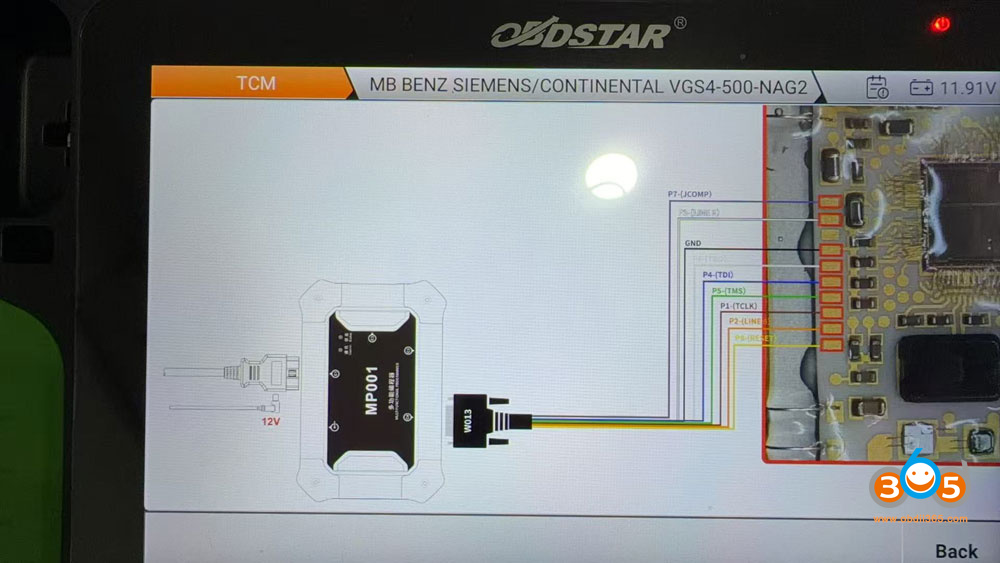
Q: Where to get the OBDSTAR C4-08 adapter kit for Benz VGS4-500-NAG2 gearbox TCU? It is out of stock everywhere.
OBDSTAR has modified the VGS4 TCU function and menu. You don’t need the C4-08 kit anymore.
For VGS4-0-NAG2 Gearbox:
OBD/Bench
OBDSTAR has the option to virgin TCU via obd or bench.
-
MB BENZ SIEMENS/CONTINENTAL VGS4-0-NAG2 Reset Virgin (Renew) function(OBD/BENCH).
OBDSTAR has aOBDSTAR TCM-012bench fast cable for VGS4-0-NAG2 without soldering.

Use C4-07 adapter kit if needed to transfer VGS4 data in Jtag mode.
For VGS4-500-NAG2 Gearbox:
Bench mode: useOBDSTAR TCM-014bench fast cable.
-
MB BENZ SIEMENS/CONTINENTALVGS4-500-NAG2Read Data, Data Transfer(Personalization), Write VIN functions(OBD/BENCH);
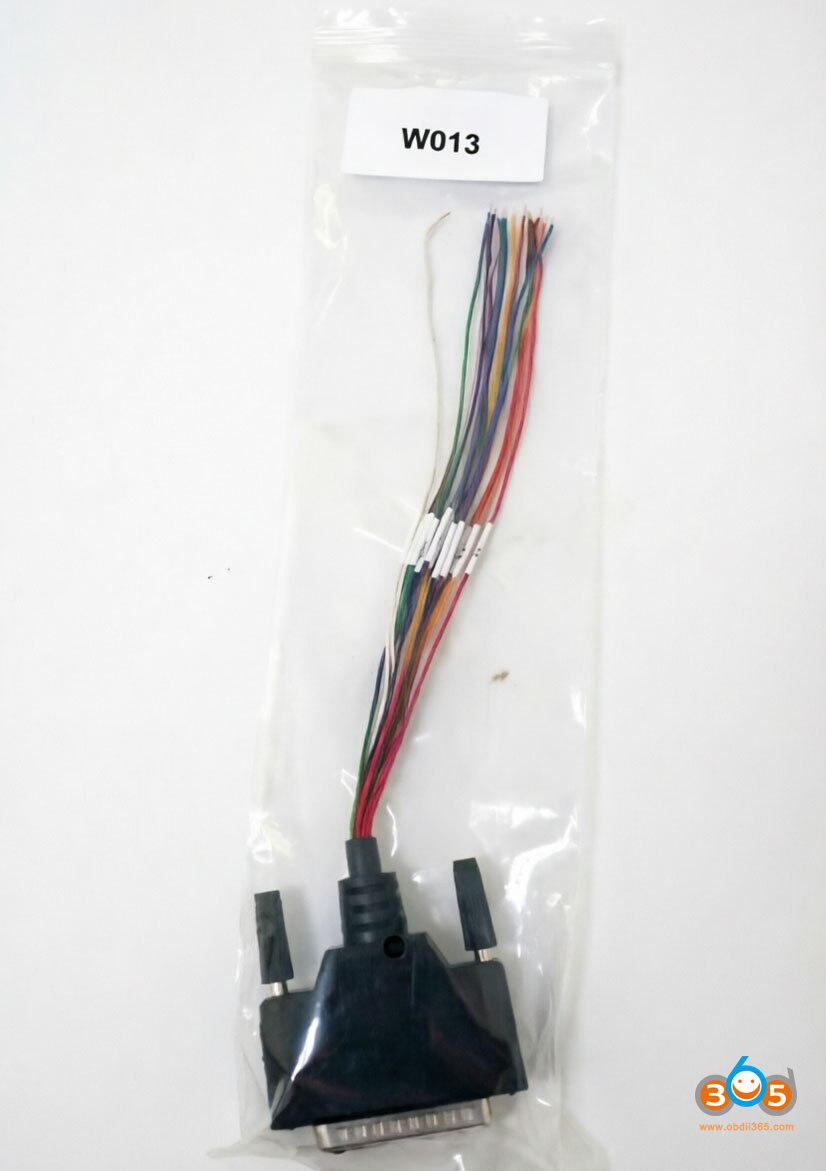
Jtag mode: No need to use C4-08 adapter. Use theW013 cable. G3 or DC706 will show you the wiring diagram.
-
MB BENZ SIEMENS/CONTINENTALVGS4-500-NAG2Read Data, Virgin (Renew), Data Transfer (Personalization), Write VIN functions(JTAG);


FYI:
VGS4 Compatible tools:
– Autel im508s/im608 ii just updated
– Obdstar DC706- confirmed
– Abrites- Confirmed
– Launch x431 x-prog3-confirmed
-Diag code ExtremeVGS4- yet to confirm
Posted by: jean at
08:44 AM
| No Comments
| Add Comment
Post contains 168 words, total size 4 kb.
June 11, 2026
Problem:
It is a Renault Clio 4 2018 with all smart card lost.
Some one try to added card but unfortunately the HFM is become blank.
Now I don’t have the pin original from the HFM or Card.
How can i resolve this problem?
Best way;
Go dealer and say after empty battery this problem is starts. The can flash the module and the car starts fine!
But if you say after key learning, they will tell you to buy new HFM module.
Updated:
Problem solved.
1-i take other Clio 4 and i read her HFM Bench mode (Dflash and Pflash).Autel IM608 XP400 ProandOBDSTAR G3will read the HFM module.
2-i write this files in my HFM and i programmed my HFM in the other Clio 4.
3-i virgin ECM and EPS
4-i bring a emulator for ESCL
5-i paired all components with diagnostic tool.
and car starts.
Posted by: jean at
08:30 AM
| No Comments
| Add Comment
Post contains 155 words, total size 1 kb.
30 queries taking 0.0555 seconds, 213 records returned.
Powered by Minx 1.1.6c-pink.