



April 25, 2025
Problem:
After the most recent update, theCGDI K2key tool device only boots up to the startup screen and then freezes, becoming unresponsive. The device has been used according to the manufacturer’s guidelines, and the problem only began following the latest update 4.0.0.


Solution:
Reflash firmware will resolve this problem.
Free download CGDI K2 reflash file:
CGDI K2 Firmware Reflash Procedure:
Step 1: Open folder, Run "CGDIK2_Install.exe”, the tool will automatically start installing CGDI K2.

Step 2: Installation is complete and prompt: "Installation successfully”

If after opening "CGDIK2_Install.exe”, the tool prompts "Device not connected or driver not installed”

First check whetherCGDI K2is connected to the computer. Go to "This Computer” and check whether there is "CGDI K2”.
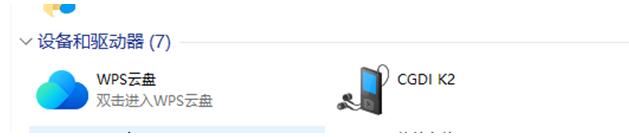
If the device is connected properly, you need to disconnect K2 and run "DriverInstall.exe”

Click "Install” to continue with the installation

Remove the USB device first, click "Yes” to continue

Installing…

Restart the computer

The MediaTek SP Driver has been installed on the computer, click "Finish” to exit Setup

After clicking Finish, restart your computer and repeat steps 1 and 2 at the beginning of the document.
Posted by: jean at
07:27 AM
| No Comments
| Add Comment
Post contains 194 words, total size 5 kb.
35 queries taking 0.0557 seconds, 199 records returned.
Powered by Minx 1.1.6c-pink.

